Introduction About Site Map

XML
RSS 2 Feed RSS 2 Feed
Navigation

Main Page | Blog Index

Archive for the ‘Laptops’ Category

Tidying Up Today

Maintenance time

About half a day ago I rebooted, patched, then rebooted again “vonick”, my primary laptop. All went well. The system runs faster now.

I don’t like rebooting often because it takes a while to restore activities, sessions, processes, and there’s a lot of disruption to workflow (also cognitive burden). But I recognise that my kernel was long overdue for an update.

The “churn” in Linux grew due to slop, with frequent reminders to update, sometimes even when bugs are neither critical nor remotely exploitable.

While rebooting I took the opportunity to clean the desk and the laptop. It’s harder to clean keyboards when machines are turned on and there are other laptop buttons (e.g. Wi-Fi) you must not touch.

I feel a lot better today and well organised for now. Soon it’ll be Christmas and I’ll tidy up files, backups etc.

The pace of life has been good this year.

The Old Laptop, ‘Ted’

Today is shaping up to be productive, water spillage brought back memories of Ted

laptop-twitter

An old laptop called Ted finally died (or was, in effect, decommissioned) in 2020. Rianne bought Ted around 2010.

Ted has since then done lots of hard work.

So I bought a laptop to replace it. That other laptop is still working, it needed its storage replaced once (January 2023), and earlier today while cleaning and treating the tank of the danios I spilled some water on the keyboard. I reacted quickly by drying that up with paper towels, then turning the keyboard upside down. All the buttons survived this spill.

Phew!

For some context, the tank is right next to my keyboard, just 2 inches away. It’s intentional, as the fish can enjoy the lights from the keyboard even when I am away from keyboard. It’s not bright, it’s just enough to help ambient visibility.

In Ted’s case, many keys no longer worked, the monitor was in awful condition (would hardly turn on), even the hard-driving was falling apart already. Tons of bad sectors. When I tried running Ted with an old Live CD I had issues with the monitor and keyboard, never mind if I bypassed the writable drive.

Ted had only 2 GB of RAM. Maybe I can recycle that RAM one day.

I still keep Ted around, it’s below my dispensing unit and acts as a coaster of sorts.

Thank you, Ted, you’ve helped us so much.

Retiring “Iza”

After a decade

Today I took an old ARM laptop out of the kitchen because its battery is barely sufficient to even complete booting. It can run from the mains, but if the battery is too weak, then it won’t even do that. It’s something dumb about the hardware design.

I think that laptop turns 10 next year.

I checked how to swap batteries on this type of laptop, but it’s complicated, risky, and the batteries aren’t cheap.

Badly designed.

Three Years of Uptime on Laptop

Nothing lasts forever

Yesterday I rebooted the laptop “bubi” for the first time since December 2023. It was up and running nonstop for nearly 3 years.
When reboots are as rare as this you kind of worry the reboot sequence might not complete due to file system repair needs.

GNU/Linux is thankfully still reliable enough

GNU/Linux According to Clownflare

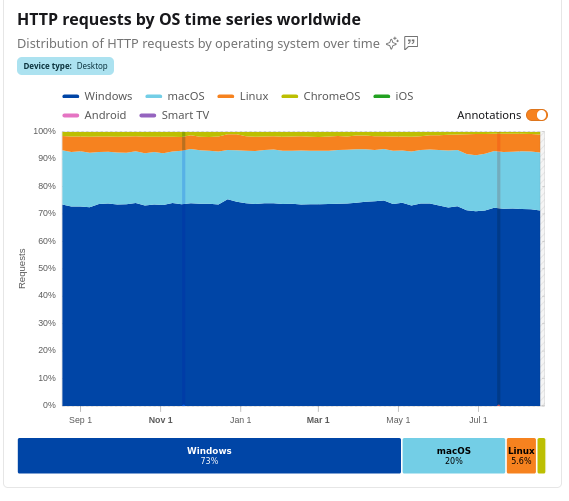
HTTP requests by OS time series worldwide

I have just taken a look at 12-month trends in Clownflare. It’s not hard to see how in the past year GNU/Linux steadily gained. Another year or two like this and the international average might show 10% or more for GNU/Linux.

In statCounter it already says 9% or more.

GNU/Linux Won Desktops/Laptops

IN 2000 when I first began using GNU/Linux as a “desktop” (not just laptop) it ran GNOME, KDE, and all sorts of simpler environments. It was good for development but harder to “use” if something more advanced was required that assumed you were a Windows user. The Web, games, and proprietary Office formats were barriers.

Now, 26 years later, GNU/Linux makes huge gains and the above barriers are mostly a thing is the past.

The progress was gradual; many attacks (FUD and ‘cancel culture’) slowed down this progress.

6 Heads Under $1000

My desk in May

WITH a bunch of low-cost hardware, some of which as cheap as under $200 (for laptops!) from displays or ‘pre-owned’ (slightly used), I’ve managed to build my workspace over the years. The cost may seem hard to believe; there used to be 4 laptops, but one died a month ago after 11 years (when it was bought by my wife in 2009 it cost more than those 3 laptops combined) and the remaining items — both screens and laptops — cost less than $1000. 3 screens, 3 laptops. The cost of the most expensive laptop — my main workstation — was less than the cost of the chair (224 pounds) and software costs are zero (GNU/Linux is free and all the applications I ever use cost nothing).

Retrieval statistics: 21 queries taking a total of 0.096 seconds • Please report low bandwidth using the feedback form
Original styles created by Ian Main (all acknowledgements) • PHP scripts and styles later modified by Roy Schestowitz • Help yourself to a GPL'd copy
|— Proudly powered by W o r d P r e s s — based on a heavily-hacked version 1.2.1 (Mingus) installation —|