


How to Delete Your GitHub Account to Tell GitHub What You Think About Their Decision to Sell Out
 Filed under:
  T IS now pretty much confirmed that GitHub has sold out to help Microsoft cause further damage to Free software (FOSS). In a nutshell, Microsoft’s motivation is shallow enough to see:
- Microsoft wants to pretend FOSS was never the competition (this causes confusion which serves Microsoft’s bottom line)
- Microsoft will lie to officials who sign contracts about being an “open source company” (all of Microsoft’s core software remains proprietary with malicious features like surveillance and DRM)
- Buying out, controlling the competition
- Patent blackmail, bribery and other attacks on FOSS carry on while Microsoft pretends that all is well (“we come in peace”)
So it’s time to devalue GitHub; it won’t make it any cheaper for Microsoft to buy at this stage (they agreed on the price).
If you have substantial work on the site, migrate away. Here, for example, is how to import your project from GitHub to GitLab.
Then it’s time to delete.
Log in, then enter the following address: https://github.com/settings/admin
Follow these steps:
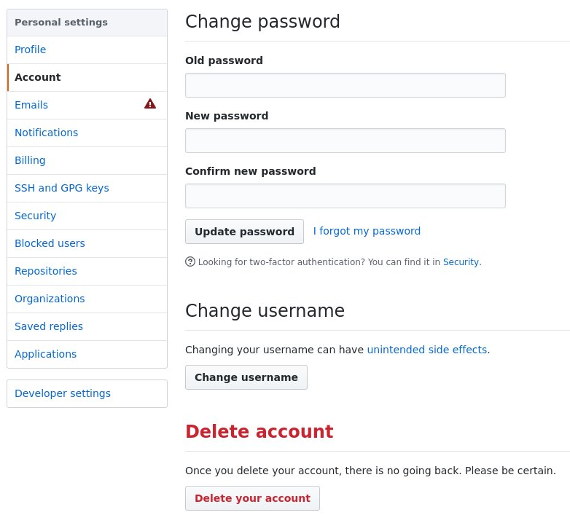
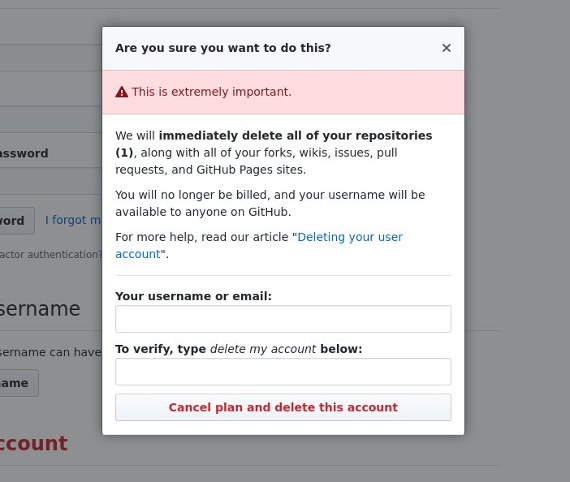

They then send out an E-mail:
Subject: [GitHub] Account deletion
This email is to confirm that you’ve deleted your account ‘schestowitz’ from GitHub. Your repositories and content have been deleted from the system. If you were on a paid plan, you will not be billed again. We’re sorry to see you go. You can reply directly to this email if you have any questions or feedback, we’d love to hear from you.
Tell others to do the same thing. I will soon urge my wife (when she wakes up) to do the same. Only fools (not her) believe lies like “Microsoft loves Linux”.


 ESTERDAY I
  oday I wrote the following
  ith a training set of just a dozen positives from a single car I have let the experiment run. The purpose of this experiment is to test the alarm (collision) mechanism for short-range D alone.
 ascade classification is easy to work with in OpenCV, but it is not so well documented. This series of short videos explains how this is done on GNU/Linux-based systems (although it may be useful and applicable to other platforms too). The videos were not scripted or planned, so please excuse the occasional stuttering and mistakes.