Introduction About Site Map

XML
RSS 2 Feed RSS 2 Feed
Navigation

Main Page | Blog Index

Archive for the ‘Technology’ Category

Cost-effective Computers

Macs cluster

Acedemic institutes seek to provide a large number of workstations to their students. The more workstations, the more of computer-based education fits into the school’s curriculum. An observation can be made which says that schools buy the wrong computers. Licences for the software they run, despite the bulk discounts, can cost as much as the computer itself, if not exceed that cost. When accommodating a computer cluster and paying over $1000 per Windows-based machine, the number of available computers will inevitable drop. As Linspire.com shows, each student in Indiana will soon have his/her own Linux box at school. This is particularly important where kids do not have a computer at home. Will more schools follow suit? This certainly happens in Manchester as well, albeit rather slowly.

Red hat
RedHat Linux

As hardware costs drop, it is gets harder to defend the purchasing of commercial software. The price of development does not not necessarily rise because of offshoring, but the availability of richer Open Source software goes up owing to the Internet, killing commercial equivalents in the process. This, in fact is one of the reasons for the success of Windows 95. Back in the days, plenty of software was bundled while getting new applications remained a time-consuming task in the absence of rapid access to the Net.

PDA’s and Security

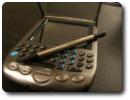
Three major risks are involved with the ownership of a handheld device. Below is a brief overview on fragility points to watch out for.

1. Vandalism

From Insecure Magazine comes a comprehensive document on Pocket PC security (PDF) which states:

These devices (PDA‘s) are easy to smuggle into a business and can be used to propagate an attack against network devices. Don’t make the mistake of assuming is a PDA is a simple data keeper. As the cliche’ goes… it is how you use it that matters.

2. Viruses

TreoPalm viruses were created as “proof of concept”, but haven’t been found “in the wild” frequently, if ever. The Treos, however, might make the exception. Either way, AV software for the Palm seems unnecessary and you are advised to spend your money where it makes a greater difference and does not cripple your CPU. Data gets backed up during the frequent synchronisations in any case.

3. Privacy Invasion

Lastly, as more handheld devices incorporate Wi-Fi, it is worth mentioning how penetrable data packets actually are. To convince yourself that Wi-Fi is not secure at present, simply follow the links below:

Cited by: PalmAddict

Data Loss Humor

A ZDNet item that got Slashdotted moments ago reminds me why I back-up my data so frequently and frantically.

…A woman placed her laptop on top of her car while she got in. She forgot about the laptop, which slid off the back of her car, and she then reversed straight over it and reported hearing a ‘crunch’…

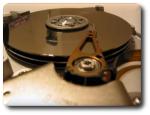
Hard-drive platterMy seriousness when it comes to backup peaked a couple of months ago. As part of my ‘paranoia approach’ to backup, I have bi-weekly procedure which includes mirroring my entire hard-drive (~150,000 files), doing data integrity tests and a shallow sanity check using ‘diff‘ to ensure that no data was explicitly erased by accident.

Related items:

Invites to Combat Spam

Sky scrapers
Scrapers: where is the original content? Left or right?

Several companies including Google have devised mechanisms so as to avoid becoming the hosts to spammers. It is broadly agreed that spam blogs (also referred to as “splogs”) and spam-generating E-mail accounts can easily damage the reputation of the ISP or the on-line service which provides the bandwidth. Consequently, Google have reacted to spam blogs in a variety of ways and required Google Mail subscribers to be invited by another existing member (“friend brings a friend”), thus establishing trust. Moreover on the issue of spam, content spam can finally be reported and feedback acted upon.

The brand-new WordPress.com, a service similar to that of TypePad and Blogger, takes the same approach as GMail and distributes “invites”. A limit on the number of invites helps the battle against spam over HTTP. While their mechanism appears similar to that GMail invites, it serves a different puspose and has different implications. With spam blogs being endemic, one needs to gain control over who creates blogs, as well as how many. The requirement for a referral from a friend is a novel idea, which can result in a highly-reputed network of blogs. It would attract the best bloggers from ‘junk networks’ characterised by plagiarism, hotlinked (sometimes stolen) graphics or content that provokes hatred and intolerance.

Where else can this idea of invites be used? Virtually in any domain which involves public account instantiation, e.g.:

  • E-mail accounts
  • Blogs
  • Webspaces
  • On-line bookmarks such as del.icio.us

Many other services are moving online (possibly reaching out for on-line operating systems), so we shall see spam hitting many other types of services in the future. Not so long ago I wondered if there would be a place for invites trading on eBay. I guessed it was only a matter of time. Links and PageRank likewise. It was a few days that a WordPress invite ended up in an eBay auction, much as I had predicted. That means that people earn money for subscription to services they do not own! So, under certain circumstances, spamming appears to be substituted by scalping.

Google Desktop – Verging a Google Browser?

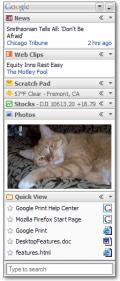
Google Desktop 2Only months after the release of Google Desktop, the much richer Google Desktop 2 has been announced. This native desktop software, as well as indexing and searching one’s hard-drive, incorporates a controversial sidebar. This sidebar contains RSS feeds, a virtual Gmail inbox, news headlines and more utilities and plug-ins like a scheduling toolset.

Will this truly provide the infrastructure to what might become a Google homebred Web browser? This kind of browser would make the Google-centric application everything that you will ever need. Would such strategy move all the users’ data on-line, namely mail, schedule and settings? Will this make our lives even more portable? Surely there is potential for this vision, which is not baseless. Google have strong ties with the Mozilla Foundation and they may have pondered the possibility of a Google browser in the past. Some sources claim they have.

Related items: Google OS – What if?, Towards On-Line Operating Systems

40 GB per Platter

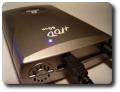
External hard driveIt’s coming! The perpendicular magnetic recording (PMR) hard-drive has been released by Toshiba for the first time. This 1.8 inch hard-drive takes us closer to the vision of huge capacity concentrated within a tiny space. As storage barriers are breached, not only laptops, but also handheld devices begin to challenge the desktop. This condensation of storage is particularly valuable for miniscule devices such as PDA‘s.

The disk stores 40GB in a single platter, and there are plans to release a 80GB version later this year

…

Toshiba is currently shipping the 40GB MK4007GAL to OEM and channel partners. The company plans to apply PMR technology to its 0.85-inch HDD in 2006, increasing capacity to 6GB-8GB per platter.

With many modern machines, the large numbers of platters relies on physical space being available. This enables manufacturers to sell hard-drive that reach hundreds of gigabytes (soon terabytes) in capacity. Expect PDA’s to contain a much greater amount of space soon, which is a pre-requisite to using them as hard-drives on full-sized PC‘s. Portable devices such as the Palm LifeDrive should be able to increase ten-fold in terms of capacity. This will probably happen some time in the near future when they equate to the capacity of the iPod (up to 60GB), for instance.

Cited by: PalmAddict

Computers Become Hosts

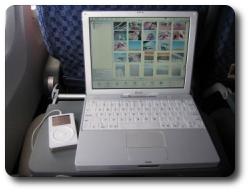
Laptop and iPod
Computers to be driven purely off the iPod/Handheld device

Imagine yourself the following scenario: To start up your computer you connect an iPod (or any other large-storage mobile device) to your (x86-based) work computer, which then launches the operating system (currently Knoppix Linux) from the iPod. It uses the processor and memory of the local machine rather than the iPod’s, which is merely used as a hard-drive. Then, once work is finished, you take your iPod home and repeat that exact same procudure, plugging in the iPod to a different computer. Not only can you resume your work, but your hard-drive (which contains everything that is personalised) gives you an identical environment, i.e. you have all your recent files, browser cookies, desktop settings, etc.

That vision is now real as IBM exploit the iPod for this purpose. The device could, in principle, be a Palm LifeDrive, which makes the exception among modern PDA‘s since it exploits very high data capacity. The large-sized hard-drive and high bandwidth (USB/FireWire) make it possible to use your machine merely as a host (computation, display, and peripherals), while your data (operating system, files and applications) always remain in your pocket. From an article just published in CNET:

The virtual computer user environment setup is called SoulPad, and consumers install it from a x86-based home or office PC. SoulPad uses a USB (universal serial bus) or FireWire connection to access the network cards for connecting to the Internet, the computer’s display, the keyboard, the main processor and the memory, but not the hard disk.

Also worth mentioning is the prospect for running your favourite operating system and programs to access your data on any computer. You could even use a workstation at your local library cluster. Plug in your mobile device and use the computer as if it was yours. This considerable step can give a major boost to devices such as the iPod and the LifeDrive. Perhaps Jeff Hawkins, Palm co-founder and R&D chief, had substance in his vision of the “Life Manager”. Could this be what Palm had in mind when switching to Linux?

On a less enthusiastic note, the entire idea of protable high-volume storage is not brand new. For quite some time it has been possible to install hard-drive housing units in one computer and slide in different hard-drives that suit different users of the same computer. This essentially meant that computers came without a hard-drive; hard-drives were provided by the users. However, with a handhelds like the LifeDrive, several major advantages spring to mind:

  • Size, which is a major pro
  • The ability to view and edit data on the go, unlike just carrying a ‘black box’
  • Internet connectivity
  • Infra-red communication

Cited by: PalmAddict

Retrieval statistics: 23 queries taking a total of 0.120 seconds • Please report low bandwidth using the feedback form
Original styles created by Ian Main (all acknowledgements) • PHP scripts and styles later modified by Roy Schestowitz • Help yourself to a GPL'd copy
|— Proudly powered by W o r d P r e s s — based on a heavily-hacked version 1.2.1 (Mingus) installation —|