Introduction About Site Map

XML
RSS 2 Feed RSS 2 Feed
Navigation

Main Page | Blog Index

Archive for the ‘Technology’ Category

Longhorn Renamed Windows Vista

Longhorn

Spherical desktop – experimental demo

Longhorn beta
Longhorn beta – recent screenshot

Longhorn has just become Windows Vista (also see BBC and CNN reports).

The new name, which means view, reflects on the main point of emphasis for the operating system, namely looks. As mentioned before, Longhorn/Vista will be little more than Windows XP with new colours and — as more recently seen — will incorporate transparency. It has been pointed out that Longhorn/Vista will look slightly different from XP, but will offer little or no added value in terms of productivity.

One wonders if the change of names is due to the bad reputation and rumours that are accompanied with the word “Longhorn”. The name Longhorn was derived from the name of a pub, which certainly does not add to credibility.

Expensive Developers, Cheap Hardware

Linux box

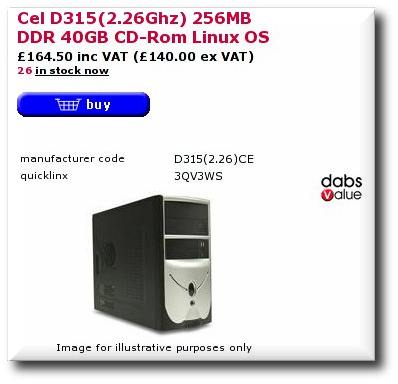
Linux computer for under $255 in the UK (click to enlarge)

Within this post lies my main argument as to why Linux (or complimentary Open Source streams or movements) will rise hugely in less than a decade. The cost of production continues to slide while human intellect (development) is among the more expensive commodities. The Zipit demonstrates that by using Linux, the leading free operating system, a PDA with WiFi, 320×240 pixels display and stereo DAC can sell for as little as $99.

Cheap computer

$299 for the entire package

In Britain, Dabs are now selling a Mandrake 9.2 Linux box (quicklinx 3QV3WS, no monitor is included) for 140 British pounds ($245) excluding VAT. Elsewhere in the world, the fully-featured MOBILIS computer (shown above) goes for only $299 list and speculations are made as to why commercial software will perish once hardware costs equate to it.

Enterprises still need software, and lots of it, to run their operations, but they are buying few new licenses. Part of the story is that the market is mature and buyers have enough software already. Part of the story is that offshore outsourcing makes it cheaper to build your own. A big part of the story is the appearance of more efficient alternatives, such as open source.

With such low prices across the market, buying a larger number of computational units is possible for prices that are comparable with that of several Windows PC‘s or Apple Macs. Server rooms will benefit in terms of performance, as they do already. Homes will be able to offer a computer to each member of the family or exploit computers for otherwise remote uses like home entertainment, productivity and automation in the garden , the kitchen (see kitchen of the future) and even the car.

Lunar Map

Google Moon logo

Google moonGoogle have introduced yet another ‘toy’ which re-uses the software from Google Satellite maps. This time, all data being used is imagery from NASA‘s past moon landings.

With nicer innovations and envious ad-free page layouts, is it truly a surprise when Microsoft executives migrate to Google? Tension is growing between these two camps as Miscrsoft recently acquired similar technologies and map data. These interactive maps have enormous value as they add a geographical aspect to the World Wide Web, which is presently in chaos. This has a huge advertising potential.

Previews on Desktop

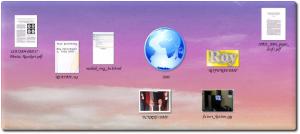
Desktop with previews

PDF‘s, text files, HTML‘s and
directories in the KDE Desktop with previews
(click to enlarge)

Ever had the experience of staring at a collection of files, wondering which one is which and puzzled by the best way of finding the text or images you are after? This was a wide-spread operating system deficiency in the nineties (there was a brute-force barrier). Nowadays, directories reflect on their content and file previews are generated on-the-fly, even over FTP, i.e. remote data.

With a large enough icon size as shown above (an example from KDE), even entire documents reflect on their content. Similar types of previews exist for animations and — oddly enough — sound.

By obtaining this reflection on content, there is no longer a need to open files in vain. Location of content becomes an easier task as it can be done visually rather than relying on filenames. Files are simply more recognisable since they express their purpose in the most natural way. If a pictures is worth a thousands words, the user is able to scan more data, more quickly.

Preview are not the only way of improving productivity. Work is being done on extending the “drag-and-drop” functionality for items, e.g. animated folding and dropping (videos included) and richer desktop interactions. As a matter of preference, I like keeping my Desktop clean, making it a ‘yet-to-complete’ list. Previews on files cannot resolve the issue of clutter and scale; they can, however, compensate for the expressiveness of filenames.

For those who do not know yet, Windows Longhorn was intended to introduce WinFS. This new filesystem, rather than using filetables (notably FAT32), was aimed at getting rid of traditional file management and filenames altogether. Nevetheless, Longhorn ended up incorporating none of the promised innovative features though.

Kitchen of the Future

Future Kitchen

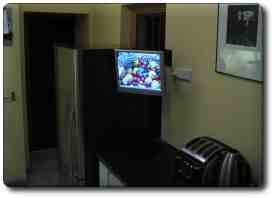
A guy called Derek posted photos from a personal project to nntp://uk.tech.home-automation. His work is inspiring and a lot of DIY was involved. Posted below are some specs and features, explained in his own words.

…

  • Monitor mounted
  • Fan and vent installed in cupboard
  • Benchtop drilled
  • Test fire of PC!

Some of the uses of this system:

  • Recipe database (incl barcode scanning of ingredients for online supermarket ordering)
  • Entertainment (MP3s, videos, TV etc from the LAN and internet)
  • Web browsing
  • VoIP calls
  • Security (four cams around the house + alarm)
  • Lighting control (possibly power down the track)

Awaiting additions:

  • Globetech keyboard/trackball
  • Install/config of Meedio

Looking a decade back, only a small proportion of homes had a computer. Nowadays, with costs that continue to fall and functionality that is on the rise, computers are lavishly bought, much like TV sets in the previous decade.

Palm Anti Virus – The Scam

It has come to my attention that a few people purchase anti-virus software for Palm-powered devices. Buying virus defence for the Palm is much like buying premium insurance for a boy’s 50 watt toy motorcycle. Even free software, which claims to offer strong virus protection, will most likely hog resources for no justified reason.

Plastic troopsIn practical terms, anti virus software for Palm handhelds is utterly unnecessary. There are two known Palm viruses, which are “proof of concept”; nothing has been shown to be malicious beyond this fabricated illusion. Such viruses are created by anti-virus developers and vendors in order to create a scare and prove that Palm handhelds are potentially penetrable. The viruses have not been found “in the wild” yet and this state is unlikely to change any time soon. Remember that Palm handhelds have remote access capabilities (SSH, telnet, VNC etc.) but do not yet allow access and control from the outside. It is simply not practical because they are mobile — it is their nature to be the controlling device (master), not the controlled device (slave). You can use your remote control to affect your TV, but not the TV to affect your remote control.

There are a couple of Trojans which depend on naivety of the users. Most experienced users, however, are wise enough avoid downloading, installing, and running software which was acquired from some obscure Web site. If such applications are run, they can wreak their havoc but cannot spread from one handheld to another. Therefore, they are not infectious like the most devastating viruses which Windows users have become familiar with.

Similar selling tactics were used on the PC in the older days. Viruses like “Pong” scared users who would then purchase protection from the same people that introduced the illness in the first place. The bottom line is: do not bother with anti virus software for Palm.

Cited by: PalmAddict

WiFi Linux PDA

Aeronix ZipitLinuxDevices.com have put together a detailed review of the Aeronix Zipit instant messenger appliance which runs atop Linux and in many senses is a fully-functional PDA with WiFi built-in. The extremely low cost of $99 proves how advantageous free operating systems can be in terms of affordability. Hackers are already in the process of manipulting this device for other, more general purposes.

…priced at $99, in colors that include white, silver, blue, red, and pink. It includes an 802.11b WiFi radio, 16-color greyscale LCD with QVGA (320×240) resolution, and a thumb keyboard with rubber buttons. Also included is a stereo DAC (digital audio converter) connected to a speaker and headphone jack.

There is a growing trend which involves installing Linux on mobile devices, Palm handhelds included. It has already been determined that Palm O/S will migrate to sit in tandem with Linux if not be replaced by Linux.

Cited by: PalmAddict

Retrieval statistics: 21 queries taking a total of 0.102 seconds • Please report low bandwidth using the feedback form
Original styles created by Ian Main (all acknowledgements) • PHP scripts and styles later modified by Roy Schestowitz • Help yourself to a GPL'd copy
|— Proudly powered by W o r d P r e s s — based on a heavily-hacked version 1.2.1 (Mingus) installation —|