Introduction About Site Map

XML
RSS 2 Feed RSS 2 Feed
Navigation

Main Page | Blog Index

Archive for the ‘Technology’ Category

WordPress Printer-Friendly

Printer-friendly version

It is relatively simple to incorporate valid printer-friendly versions into WordPress (see above for example). I coded up the feature early this morning; it did not require much time or effort. This involved little more than stripping of styles as well as other heavy features which contributed to clutter. More details and code at the hacks and themes page.

Contextually-related: PDF version of WordPress posts

Urgent Mail Account

Such a suggestion will be best addressed to everyone in possession of a single mail account. It is nothing beyond a trivial E-mail management tip. The problem in question: When an E-mail account gets checked frequently in order to detect important incoming messages, false alarms or recurring E-mail distractions lead to disturbance and interfere with persistent work.

This is where the Urgent E-mail Account becomes of great value. By creating a new account, which is designated solely for important mail, notifications about urgent messages can be raised within just minutes. If the urgent account resides on the same domain as the normal/casual mail account, a filter can easily be created. This filter can be based on the name of sender/s or rely on a special word like ‘urgent‘ embedded in the subject line. Whenever such a filter test passes for a given messages, the message should automatically be re-directed to the Urgent E-mail Account.

Using a mail checker program, E-mail accounts which contain important messages can also be checked without consuming much computer power. By setting up a vocal/musical alarm, important messages can be configured to wake up their recipient. This type of solution is valuable if, for example, server problems occur late at night. Computer systems can automatically generate an urgent E-mail message once catastrophic events get detected. Unlike human, they are unable to make a telephone call.

Separate boxes
Separating boxes to discern important message from the mundane

Towards Paper-thin Monitors

Paper-thin screen

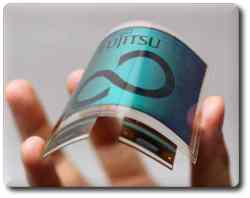
Fujitsu have introduced the bendable electronic paper. It has plenty of advantages over thin displays in existence:

  • No electricity is required for continuous display
  • Minimal power consumption when changing screen image
  • High-level display performance
  • Flexible film substrate

…electronic paper can be conveniently used in conjunction with mobile devices as an easy-to-read and portable display device.

…

Text or images from mobile phones or other mobile devices can be transferred wirelessly to larger displays for easy viewing.

Use in the home can offer more convenient digital-media devices that can be carried from room to room.

Overall, it is a very exciting innovation. On the downside, it makes the dream of a paperless office slip away.

Palm and Password Management

Like many others, I keep every password stored in my Palm. Virtually any username, password and network address which I must remember will be located under one category or another in electronic form.

Quite a long time ago I discovered, much to my surprise, that others use the exact same methods as me for storing passwords. This was not the case since they were influenced by somebody else, but simply because it seemed like the right thing to do; it came naturally. Most recently, it was a technologically-oriented lady whom I noticed ended up storing her passwords in the exact same fashion as me. This begs the questions: does every Palm user adopt the same habits? And if so, was it self-taught?

Palm TungstenNo doubt there is a certain pattern — a certain adaptable method. Many start off by entering various scattered password into a single password-protected memo (the ‘piece of paper in the drawer’ equivalent). As experience develops, time takes its toll and scale becomes an issue. Passwords begin to migrate to the address book, possibly to be laid in an organic form like password under the field called ‘other‘ or ‘address‘ while the account name becomes just ‘name‘. In due time, even a single category in the address book does not suffice because of the ever-increasing number of accounts. Then, different categories for different passwords get created. This establishes layering, or a shallow hierarchy.

There is a huge advantage to this approach: when each and every record containing a password is marked ‘private‘, there is essentially one ‘master password’, much like a master key. The method rids you from the need to remember passwords. One password will unlock all others. It enables you to use a variety of different passwords without ever needing to memorise them.

Yet, as a final word of caution, records are not entirely safe on your computer (the PC-side). When you HotSync your data, this data is transfered and then stored unencrypted (in readable form) on your filesystem. Access to your hard-drive enabled access to your passwords, especially by a Palm-proficient intruder, perhaps an overly curious colleague. Having said that, the method fully protects your password in cases of PDA theft. I once came across all passwords of an MIT system administrator (while searching the Web for Tasks conversion tools) and informed him immediately so that he could empty corresponding Google cache. Needless to mention, he was frustrated and puzzled.

In summary, read the suggestions carefully and internalise what other people have learned from their mistakes. Be aware of the pitfalls and sensitivities of the method to intrusion. Lastly, never let your brain be consumed by a collection of crypic passwords. Remember just one master password.

Cited by: PalmAddict

Excessive Use of Compression

Compression is often used unnecessarily. Two advantages can be gained by compressing files:

  • Centralising a collection of files in one single file
  • Reducing the overall volume of data

CompressorTarring of files can handle the former task while the latter can have no positive effects (e.g. when compressing JPEG files that are already condensed). In some circumstances, the data being compressed is very light to begin with. Why compress it and lead to complications (indexing and searching, latency in opening files, re-ordering, etc.)? Why compress Web pages in Apache when there is still incomplete support by browsers? As regards databases, anybody whose textual content exceeds 10 MB is serious about Web development and thus will have plenty of server space to spare.
There are a few cases where use of compression can be justified. For example, genome sequencing benefits greatly from compression (DNA can be immensely big). On the contrary, text-only content, which excludes graphics and other gratuitous media, will often be small in terms of volume. Old log files on Web servers, as yet another example, barely ever get accessed (hence no latency when uncompressed) and are easily reduced in size (patterns that recur make it over 80% compressible). Lastly, backups of large data volumes (e.g. mirrors) might be worth the complications associated with compression. That is exactly when size becomes the major issue.

Changing Terrain

Optical mouseThe word on the street is that Microsoft’s CEO, Steve Ballmer, has lost a lot of weight recently. Perhaps he cannot sleep at night either, or perhaps, even more possibly, he is simply on a diet. I prefer to believe that he lost his appetite once he fully comprehended the fierce competition, which he reluctantly admitted to in a very recent interview on innovation (video in Windows-only WMV format, so see cocky comments instead). Microsoft have plenty of reasons to worry:
  • Internet domination – Firefox and Google are slowly taking control of the Net. Software migrates to the Web and becomes more inter-operable. This by all means accumulates to more bad news to Microsoft.
  • Mac and Tiger – Scoble of Microsoft has admitted that Mac OS is ahead of Window in terms of its capabilities. Eye candy is not the only advantage Apple have to offer.
  • Security – Windows is still unable to cope with the many security flaws and viruses. The industry is getting fed up.
  • Breaking proprietary – Samba has opened up network protocols, allowing file and printer sharing to be compatible with non-Windows operating systems and work in tandem. Open Office makes popular Windows formats readable under most platforms and continues to improve dramatically.
  • Productivity and innovation – Longhorn offers only mere gains as all “three pillars” were conceded due to self-imposed time constraints.
  • Open Source – Linux, being a source of free software substitutes, has become one of Microsoft’s biggest fears. It has gracefully been adopted recently. Michael Dell has given $100,000,000 to RedHat Linux and Fijitsu carry on with Linux, to name just a few examples that came up lately.

Copy is Power

Servers

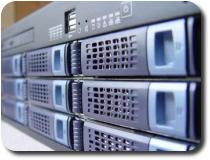
Redundancy makes computers much safer, more stable and more reliable than other aspects of our lives. Paper loss, theft — or more personally — physical damage, illness and other disastrous scenarios may be difficult to avoid. They all relate to the physical whereas information itself is metaphysical.

In IT there is rarely any need to step back and cope with losses. Only momentum can be hindered. The famous song by the Beatles suggests that the same does not hold for actual life. The phrase “How I long for yesterday” means that restoration of a past state is often not possible. On the contrary, with information stored electronically, assuming frequent backups are retained, we can fully restore what we had yesterday. We have what businesses have come to know as “damage control”.

On a more technical tone, I back up my Web servers every 2 days and my databases every single day. My entire hard-drive (excluding applications and media such as music and video) gets mirrored twice a week. Rather than overwriting old backups, I keep a stack as large as the hard drives can hold, so they are usually nearly full. More efficient backups would involve CVS-like mechanisms or tools like rsync, but practicality greatly depends on the bandwidth available.

Backup makes the haven when disaster hits. Copy, copy, duplicate and mirror. Excessive backup: no such thing. You never know how this will save you from a broken hard-drive, a mistakenly deleted directory or mysterious critical changes to settings.

Retrieval statistics: 21 queries taking a total of 0.095 seconds • Please report low bandwidth using the feedback form
Original styles created by Ian Main (all acknowledgements) • PHP scripts and styles later modified by Roy Schestowitz • Help yourself to a GPL'd copy
|— Proudly powered by W o r d P r e s s — based on a heavily-hacked version 1.2.1 (Mingus) installation —|