recently needed to gather 3-D data of different people’s faces, in order to perform experiments on these and test new algorithms that I had developed. The problem was, without some metadata regarding expressions, how might I find correct pairs suiting a particular criterion/ia? Two universities that I contacted had some data of this kind, but they were unwilling to share it (Open Data principles betrayed). So I had to do it myself using a dataset I mentioned here before [1, 2]. So far I have covered smiles and since it takes a lot of time to achieve this, I would like to share my work with those pursuing similar data.
To proactively remove allegations of the set being too easy to deal with (picky-ness in peer review), the most difficult partition when it comes to acquisition quality is taken. The figure below shows some examples of pairs that are being used after being selected as not many images contain expression variation. The selection process of very tedious as very few 3-D images exist with expressions in them, especially ones from the same person (required for consistent training assuming intra-subject residues are alike for common expressions).
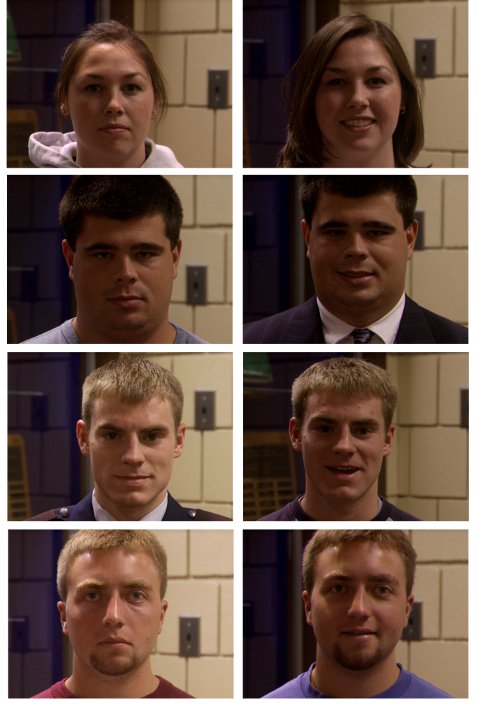
Examples of the faces used tor training and recognition, with neutrals on the left and smiles on the right (note: this is just the texture of 3-D images)
About 5 hours were spent classifying the NIST datasets for future experiments. An initial subset of it is put in loader files. From the whole 3-D data of the Face Recognition Grand Challenge, one can only find a few hundreds of distinct individuals. Not all of them have an acquisition with a smile. I found just over 80 by manually browsing everything and some will be hard to work with due to obvious cases of degraded signal. The criteria was that all parts of the face (mouth upwards) must be visible and the expression one of happiness, not necessarily a smile.
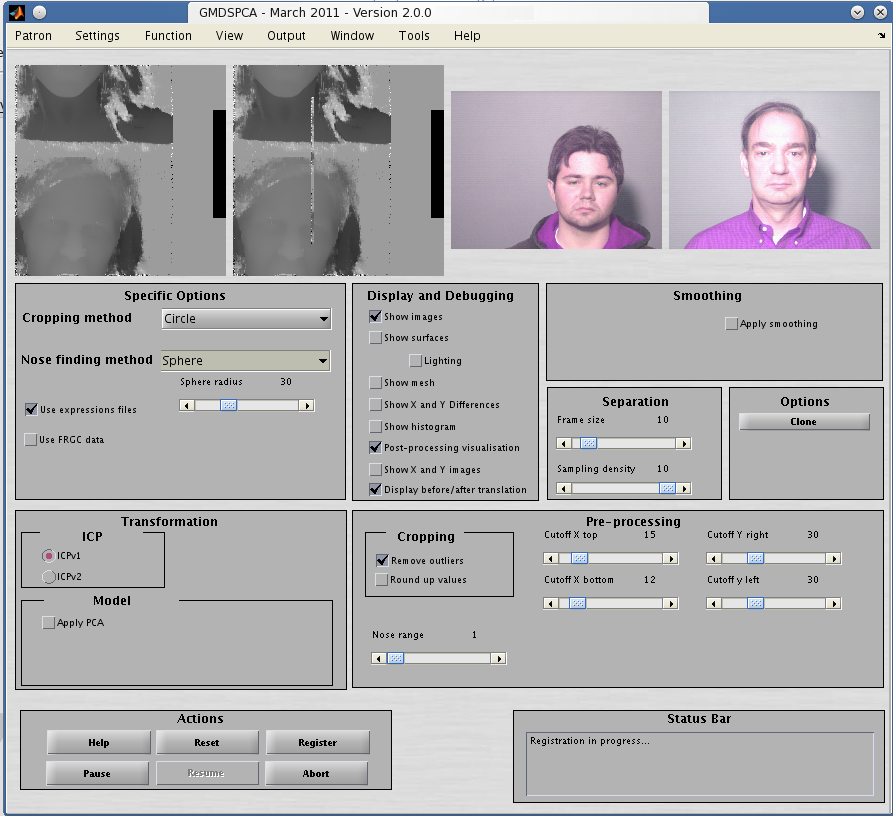
The program works reasonably well (see the figure below) with new implementations of ICP (there are two main ones from my research group) and the new data which comprises 86 pairs, or 172 images in total.
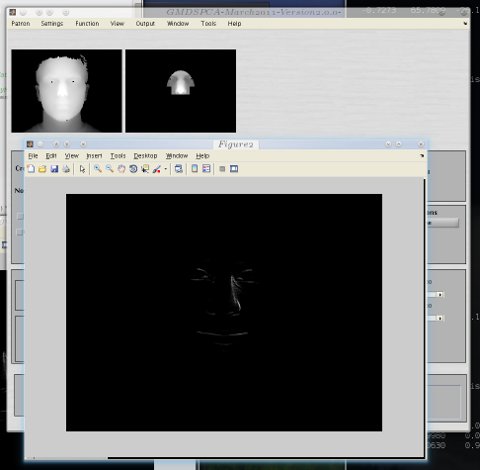
Examples of the program with the new data and methods in place
Here is the statement for loading the pairs of expressions in GNU Octave or in MATLAB, in case someone needs a large pile of gigabytes of consistent expressions data.
    images_list={'neutral'
  ;'~/NIST/FRGC-2.0-dist/nd1/Fall2003range/04471d273.abs'


  ;'smile'
  ;'~/NIST/FRGC-2.0-dist/nd1/Fall2003range/04471d271.abs'


  ;'neutral'
  ;'~/NIST/FRGC-2.0-dist/nd1/Fall2003range/04472d226.abs'


  ;'smile'
  ;'~/NIST/FRGC-2.0-dist/nd1/Fall2003range/04472d230.abs'


  ;'neutral'
  ;'~/NIST/FRGC-2.0-dist/nd1/Fall2003range/04473d185.abs'


  ;'smile'
  ;'~/NIST/FRGC-2.0-dist/nd1/Fall2003range/04473d193.abs'


  ;'neutral'
  ;'~/NIST/FRGC-2.0-dist/nd1/Fall2003range/04479d222.abs'


  ;'smile'
  ;'~/NIST/FRGC-2.0-dist/nd1/Fall2003range/04479d224.abs'


  ;'neutral'
  ;'~/NIST/FRGC-2.0-dist/nd1/Fall2003range/04484d189.abs'


  ;'smile'
  ;'~/NIST/FRGC-2.0-dist/nd1/Fall2003range/04484d191.abs'


  ;'neutral'
  ;'~/NIST/FRGC-2.0-dist/nd1/Fall2003range/04485d290.abs'


  ;'smile'
  ;'~/NIST/FRGC-2.0-dist/nd1/Fall2003range/04485d292.abs'

  ;'neutral'
  ;'~/NIST/FRGC-2.0-dist/nd1/Fall2003range/04488d286.abs'

  ;'smile'
  ;'~/NIST/FRGC-2.0-dist/nd1/Fall2003range/04488d288.abs'


  ;'neutral'
  ;'~/NIST/FRGC-2.0-dist/nd1/Fall2003range/04495d313.abs'

  ;'smile'
  ;'~/NIST/FRGC-2.0-dist/nd1/Fall2003range/04495d317.abs'


  ;'neutral'
  ;'~/NIST/FRGC-2.0-dist/nd1/Fall2003range/04496d246.abs'

  ;'smile'
  ;'~/NIST/FRGC-2.0-dist/nd1/Fall2003range/04496d250.abs'


  ;'neutral'
  ;'~/NIST/FRGC-2.0-dist/nd1/Fall2003range/04502d60.abs'

  ;'smile'
  ;'~/NIST/FRGC-2.0-dist/nd1/Fall2003range/04502d58.abs'


  ;'neutral'
  ;'~/NIST/FRGC-2.0-dist/nd1/Fall2003range/04505d218.abs'

  ;'smile'
  ;'~/NIST/FRGC-2.0-dist/nd1/Fall2003range/04505d224.abs'


  ;'neutral'
  ;'~/NIST/FRGC-2.0-dist/nd1/Fall2003range/04507d309.abs'

  ;'smile'
  ;'~/NIST/FRGC-2.0-dist/nd1/Fall2003range/04507d305.abs'


  ;'neutral'
  ;'~/NIST/FRGC-2.0-dist/nd1/Fall2003range/04509d276.abs'

  ;'smile'
  ;'~/NIST/FRGC-2.0-dist/nd1/Fall2003range/04509d282.abs'


  ;'neutral'
  ;'~/NIST/FRGC-2.0-dist/nd1/Fall2003range/04508d83.abs'

  ;'smile'
  ;'~/NIST/FRGC-2.0-dist/nd1/Fall2003range/04508d85.abs'


  ;'neutral'
  ;'~/NIST/FRGC-2.0-dist/nd1/Fall2003range/04511d178.abs'

  ;'smile'
  ;'~/NIST/FRGC-2.0-dist/nd1/Fall2003range/04511d176.abs'


  ;'neutral'
  ;'~/NIST/FRGC-2.0-dist/nd1/Fall2003range/04514d326.abs'

  ;'smile'
  ;'~/NIST/FRGC-2.0-dist/nd1/Fall2003range/04514d328.abs'


  ;'neutral'
  ;'~/NIST/FRGC-2.0-dist/nd1/Fall2003range/04513d303.abs'

  ;'smile'
  ;'~/NIST/FRGC-2.0-dist/nd1/Fall2003range/04513d309.abs'


  ;'neutral'
  ;'~/NIST/FRGC-2.0-dist/nd1/Fall2003range/04530d321.abs'

  ;'smile'
  ;'~/NIST/FRGC-2.0-dist/nd1/Fall2003range/04530d323.abs'


  ;'neutral'
  ;'~/NIST/FRGC-2.0-dist/nd1/Fall2003range/04519d204.abs'

  ;'smile'
  ;'~/NIST/FRGC-2.0-dist/nd1/Fall2003range/04519d210.abs'

  ;'neutral'
  ;'~/NIST/FRGC-2.0-dist/nd1/Fall2003range/04531d297.abs'

  ;'smile'
  ;'~/NIST/FRGC-2.0-dist/nd1/Fall2003range/04531d295.abs'


  ;'neutral'
  ;'~/NIST/FRGC-2.0-dist/nd1/Fall2003range/04537d328.abs'

  ;'smile'
  ;'~/NIST/FRGC-2.0-dist/nd1/Fall2003range/04537d330.abs'


  ;'neutral'
  ;'~/NIST/FRGC-2.0-dist/nd1/Fall2003range/04535d213.abs'

  ;'smile'
  ;'~/NIST/FRGC-2.0-dist/nd1/Fall2003range/04535d217.abs'


  ;'neutral'
  ;'~/NIST/FRGC-2.0-dist/nd1/Fall2003range/04546d75.abs'

  ;'smile'
  ;'~/NIST/FRGC-2.0-dist/nd1/Fall2003range/04546d71.abs'


  ;'neutral'
  ;'~/NIST/FRGC-2.0-dist/nd1/Fall2003range/04542d118.abs'

  ;'smile'
  ;'~/NIST/FRGC-2.0-dist/nd1/Fall2003range/04542d114.abs'


  ;'neutral'
  ;'~/NIST/FRGC-2.0-dist/nd1/Fall2003range/04556d311.abs'

  ;'smile'
  ;'~/NIST/FRGC-2.0-dist/nd1/Fall2003range/04556d315.abs'


  ;'neutral'
  ;'~/NIST/FRGC-2.0-dist/nd1/Fall2003range/04557d337.abs'


  ;'smile'
  ;'~/NIST/FRGC-2.0-dist/nd1/Fall2003range/04557d339.abs'

  ;'neutral'
  ;'~/NIST/FRGC-2.0-dist/nd1/Fall2003range/04559d314.abs'


  ;'smile'
  ;'~/NIST/FRGC-2.0-dist/nd1/Fall2003range/04559d320.abs'

  ;'neutral'
  ;'~/NIST/FRGC-2.0-dist/nd1/Fall2003range/04560d273.abs'


  ;'smile'
  ;'~/NIST/FRGC-2.0-dist/nd1/Fall2003range/04560d275.abs'


  ;'neutral'
  ;'~/NIST/FRGC-2.0-dist/nd1/Fall2003range/04569d288.abs'

  ;'smile'
  ;'~/NIST/FRGC-2.0-dist/nd1/Fall2003range/04569d286.abs'


  ;'neutral'
  ;'~/NIST/FRGC-2.0-dist/nd1/Fall2003range/04577d290.abs'

  ;'smile'
  ;'~/NIST/FRGC-2.0-dist/nd1/Fall2003range/04577d292.abs'


  ;'neutral'
  ;'~/NIST/FRGC-2.0-dist/nd1/Fall2003range/04580d299.abs'

  ;'smile'
  ;'~/NIST/FRGC-2.0-dist/nd1/Fall2003range/04580d307.abs'


  ;'neutral'
  ;'~/NIST/FRGC-2.0-dist/nd1/Fall2003range/04581d200.abs'

  ;'smile'
  ;'~/NIST/FRGC-2.0-dist/nd1/Fall2003range/04581d202.abs'


  ;'neutral'
  ;'~/NIST/FRGC-2.0-dist/nd1/Fall2003range/04588d137.abs'

  ;'smile'
  ;'~/NIST/FRGC-2.0-dist/nd1/Fall2003range/04588d135.abs'


  ;'neutral'
  ;'~/NIST/FRGC-2.0-dist/nd1/Fall2003range/04589d246.abs'

  ;'smile'
  ;'~/NIST/FRGC-2.0-dist/nd1/Fall2003range/04589d248.abs'


  ;'neutral'
  ;'~/NIST/FRGC-2.0-dist/nd1/Fall2003range/04593d200.abs'

  ;'smile'
  ;'~/NIST/FRGC-2.0-dist/nd1/Fall2003range/04593d202.abs'


  ;'neutral'
  ;'~/NIST/FRGC-2.0-dist/nd1/Fall2003range/04595d93.abs'

  ;'smile'
  ;'~/NIST/FRGC-2.0-dist/nd1/Fall2003range/04595d95.abs'


  ;'neutral'
  ;'~/NIST/FRGC-2.0-dist/nd1/Fall2003range/04596d78.abs'

  ;'smile'
  ;'~/NIST/FRGC-2.0-dist/nd1/Fall2003range/04596d84.abs'


  ;'neutral'
  ;'~/NIST/FRGC-2.0-dist/nd1/Fall2003range/04600d249.abs'

  ;'smile'
  ;'~/NIST/FRGC-2.0-dist/nd1/Fall2003range/04600d251.abs'


  ;'neutral'
  ;'~/NIST/FRGC-2.0-dist/nd1/Fall2003range/04603d141.abs'

  ;'smile'
  ;'~/NIST/FRGC-2.0-dist/nd1/Fall2003range/04603d143.abs'


  ;'neutral'
  ;'~/NIST/FRGC-2.0-dist/nd1/Fall2003range/04605d243.abs'

  ;'smile'
  ;'~/NIST/FRGC-2.0-dist/nd1/Fall2003range/04605d239.abs'


  ;'neutral'
  ;'~/NIST/FRGC-2.0-dist/nd1/Fall2003range/04609d98.abs'

  ;'smile'
  ;'~/NIST/FRGC-2.0-dist/nd1/Fall2003range/04609d100.abs'


  ;'neutral'
  ;'~/NIST/FRGC-2.0-dist/nd1/Fall2003range/04606d180.abs'

  ;'smile'
  ;'~/NIST/FRGC-2.0-dist/nd1/Fall2003range/04606d182.abs'


  ;'neutral'
  ;'~/NIST/FRGC-2.0-dist/nd1/Fall2003range/04605d255.abs'

  ;'smile'
  ;'~/NIST/FRGC-2.0-dist/nd1/Fall2003range/04605d253.abs'


  ;'neutral'
  ;'~/NIST/FRGC-2.0-dist/nd1/Fall2003range/04622d238.abs'

  ;'smile'
  ;'~/NIST/FRGC-2.0-dist/nd1/Fall2003range/04622d240.abs'


  ;'neutral'
  ;'~/NIST/FRGC-2.0-dist/nd1/Fall2003range/04619d163.abs'

  ;'smile'
  ;'~/NIST/FRGC-2.0-dist/nd1/Fall2003range/04619d161.abs'


  ;'neutral'
  ;'~/NIST/FRGC-2.0-dist/nd1/Fall2003range/04629d144.abs'

  ;'smile'
  ;'~/NIST/FRGC-2.0-dist/nd1/Fall2003range/04629d146.abs'


  ;'neutral'
  ;'~/NIST/FRGC-2.0-dist/nd1/Fall2003range/04644d204.abs'

  ;'smile'
  ;'~/NIST/FRGC-2.0-dist/nd1/Fall2003range/04644d206.abs'


  ;'neutral'
  ;'~/NIST/FRGC-2.0-dist/nd1/Fall2003range/04645d95.abs'

  ;'smile'
  ;'~/NIST/FRGC-2.0-dist/nd1/Fall2003range/04645d93.abs'


  ;'neutral'
  ;'~/NIST/FRGC-2.0-dist/nd1/Fall2003range/04697d80.abs'

  ;'smile'
  ;'~/NIST/FRGC-2.0-dist/nd1/Fall2003range/04697d78.abs'


  ;'neutral'
  ;'~/NIST/FRGC-2.0-dist/nd1/Fall2003range/04696d40.abs'

  ;'smile'
  ;'~/NIST/FRGC-2.0-dist/nd1/Fall2003range/04696d42.abs'


  ;'neutral'
  ;'~/NIST/FRGC-2.0-dist/nd1/Fall2003range/04691d50.abs'

  ;'smile'
  ;'~/NIST/FRGC-2.0-dist/nd1/Fall2003range/04691d48.abs'


  ;'neutral'
  ;'~/NIST/FRGC-2.0-dist/nd1/Fall2003range/04688d40.abs'

  ;'smile'
  ;'~/NIST/FRGC-2.0-dist/nd1/Fall2003range/04688d36.abs'


  ;'neutral'
  ;'~/NIST/FRGC-2.0-dist/nd1/Fall2003range/04684d232.abs'

  ;'smile'
  ;'~/NIST/FRGC-2.0-dist/nd1/Fall2003range/04684d234.abs'


  ;'neutral'
  ;'~/NIST/FRGC-2.0-dist/nd1/Fall2003range/04682d122.abs'

  ;'smile'
  ;'~/NIST/FRGC-2.0-dist/nd1/Fall2003range/04682d128.abs'


  ;'neutral'
  ;'~/NIST/FRGC-2.0-dist/nd1/Fall2003range/04675d251.abs'

  ;'smile'
  ;'~/NIST/FRGC-2.0-dist/nd1/Fall2003range/04675d253.abs'


  ;'neutral'
  ;'~/NIST/FRGC-2.0-dist/nd1/Fall2003range/04673d188.abs'

  ;'smile'
  ;'~/NIST/FRGC-2.0-dist/nd1/Fall2003range/04673d190.abs'


  ;'neutral'
  ;'~/NIST/FRGC-2.0-dist/nd1/Fall2003range/04699d42.abs'

  ;'smile'
  ;'~/NIST/FRGC-2.0-dist/nd1/Fall2003range/04699d44.abs'


  ;'neutral'
  ;'~/NIST/FRGC-2.0-dist/nd1/Fall2003range/04700d18.abs'

  ;'smile'
  ;'~/NIST/FRGC-2.0-dist/nd1/Fall2003range/04700d20.abs'


  ;'neutral'
  ;'~/NIST/FRGC-2.0-dist/nd1/Fall2003range/04703d46.abs'

  ;'smile'
  ;'~/NIST/FRGC-2.0-dist/nd1/Fall2003range/04703d42.abs'


  ;'neutral'
  ;'~/NIST/FRGC-2.0-dist/nd1/Fall2003range/04704d22.abs'

  ;'smile'
  ;'~/NIST/FRGC-2.0-dist/nd1/Fall2003range/04704d18.abs'


  ;'neutral'
  ;'~/NIST/FRGC-2.0-dist/nd1/Fall2003range/04711d53.abs'

  ;'smile'
  ;'~/NIST/FRGC-2.0-dist/nd1/Fall2003range/04711d47.abs'


  ;'neutral'
  ;'~/NIST/FRGC-2.0-dist/nd1/Fall2003range/04715d12.abs'

  ;'smile'
  ;'~/NIST/FRGC-2.0-dist/nd1/Fall2003range/04715d14.abs'


  ;'neutral'
  ;'~/NIST/FRGC-2.0-dist/nd1/Fall2003range/04717d49.abs'

  ;'smile'
  ;'~/NIST/FRGC-2.0-dist/nd1/Fall2003range/04717d43.abs'


  ;'neutral'
  ;'~/NIST/FRGC-2.0-dist/nd1/Fall2003range/04719d86.abs'

  ;'smile'
  ;'~/NIST/FRGC-2.0-dist/nd1/Fall2003range/04719d88.abs'


  ;'neutral'
  ;'~/NIST/FRGC-2.0-dist/nd1/Fall2003range/04721d48.abs'

  ;'smile'
  ;'~/NIST/FRGC-2.0-dist/nd1/Fall2003range/04721d46.abs'


  ;'neutral'
  ;'~/NIST/FRGC-2.0-dist/nd1/Fall2003range/04728d44.abs'

  ;'smile'
  ;'~/NIST/FRGC-2.0-dist/nd1/Fall2003range/04728d42.abs'


  ;'neutral'
  ;'~/NIST/FRGC-2.0-dist/nd1/Fall2003range/04737d38.abs'

  ;'smile'
  ;'~/NIST/FRGC-2.0-dist/nd1/Fall2003range/04737d36.abs'


  ;'neutral'
  ;'~/NIST/FRGC-2.0-dist/nd1/Fall2003range/04737d38.abs'

  ;'smile'
  ;'~/NIST/FRGC-2.0-dist/nd1/Fall2003range/04737d36.abs'


  ;'neutral'
  ;'~/NIST/FRGC-2.0-dist/nd1/Fall2003range/04749d80.abs'

  ;'smile'
  ;'~/NIST/FRGC-2.0-dist/nd1/Fall2003range/04749d82.abs'


  ;'neutral'
  ;'~/NIST/FRGC-2.0-dist/nd1/Fall2003range/04750d54.abs'

  ;'smile'
  ;'~/NIST/FRGC-2.0-dist/nd1/Fall2003range/04750d56.abs'


  ;'neutral'
  ;'~/NIST/FRGC-2.0-dist/nd1/Fall2003range/04754d78.abs'

  ;'smile'
  ;'~/NIST/FRGC-2.0-dist/nd1/Fall2003range/04754d80.abs'


  ;'neutral'
  ;'~/NIST/FRGC-2.0-dist/nd1/Fall2003range/04756d73.abs'

  ;'smile'
  ;'~/NIST/FRGC-2.0-dist/nd1/Fall2003range/04756d75.abs'


  ;'neutral'
  ;'~/NIST/FRGC-2.0-dist/nd1/Fall2003range/04762d43.abs'

  ;'smile'
  ;'~/NIST/FRGC-2.0-dist/nd1/Fall2003range/04762d41.abs'


  ;'neutral'
  ;'~/NIST/FRGC-2.0-dist/nd1/Fall2003range/04763d68.abs'

  ;'smile'
  ;'~/NIST/FRGC-2.0-dist/nd1/Fall2003range/04763d70.abs'


  ;'neutral'
  ;'~/NIST/FRGC-2.0-dist/nd1/Fall2003range/04766d24.abs'

  ;'smile'
  ;'~/NIST/FRGC-2.0-dist/nd1/Fall2003range/04766d30.abs'


  ;'neutral'
  ;'~/NIST/FRGC-2.0-dist/nd1/Fall2003range/04767d38.abs'

  ;'smile'
  ;'~/NIST/FRGC-2.0-dist/nd1/Fall2003range/04767d36.abs'


  ;'neutral'
  ;'~/NIST/FRGC-2.0-dist/nd1/Fall2003range/04768d76.abs'

  ;'smile'
  ;'~/NIST/FRGC-2.0-dist/nd1/Fall2003range/04768d74.abs'


  ;'neutral'
  ;'~/NIST/FRGC-2.0-dist/nd1/Fall2003range/04773d84.abs'

  ;'smile'
  ;'~/NIST/FRGC-2.0-dist/nd1/Fall2003range/04773d78.abs'


  ;'neutral'
  ;'~/NIST/FRGC-2.0-dist/nd1/Fall2003range/04775d80.abs'

  ;'smile'
  ;'~/NIST/FRGC-2.0-dist/nd1/Fall2003range/04775d82.abs'


  ;'neutral'
  ;'~/NIST/FRGC-2.0-dist/nd1/Fall2003range/04777d88.abs'

  ;'smile'
  ;'~/NIST/FRGC-2.0-dist/nd1/Fall2003range/04777d84.abs'


  ;'neutral'
  ;'~/NIST/FRGC-2.0-dist/nd1/Fall2003range/04779d52.abs'

  ;'smile'
  ;'~/NIST/FRGC-2.0-dist/nd1/Fall2003range/04779d48.abs'


  ;'neutral'
  ;'~/NIST/FRGC-2.0-dist/nd1/Fall2003range/04805d60.abs'

  ;'smile'
  ;'~/NIST/FRGC-2.0-dist/nd1/Fall2003range/04805d62.abs'


  ;'neutral'
  ;'~/NIST/FRGC-2.0-dist/nd1/Fall2003range/04808d32.abs'

  ;'smile'
  ;'~/NIST/FRGC-2.0-dist/nd1/Fall2003range/04808d30.abs'


  ;'neutral'
  ;'~/NIST/FRGC-2.0-dist/nd1/Fall2003range/04821d44.abs'

  ;'smile'
  ;'~/NIST/FRGC-2.0-dist/nd1/Fall2003range/04820d36.abs'


  ;'neutral'
  ;'~/NIST/FRGC-2.0-dist/nd1/Fall2003range/04836d47.abs'

  ;'smile'
  ;'~/NIST/FRGC-2.0-dist/nd1/Fall2003range/04836d49.abs'


  ;'neutral'
  ;'~/NIST/FRGC-2.0-dist/nd1/Fall2003range/04853d50.abs'

  ;'smile'
  ;'~/NIST/FRGC-2.0-dist/nd1/Fall2003range/04853d48.abs'};
Later on I am going to publish all the code and about 100 pages of text. It needs tidying up first.


 Filed under:
  t various stages throughout my career (I am 29 now), myself and others pondered starting a blog about Open Access, Open Data or open research (opening one’s lab, including data, methods, etc.), but since I already spend more time than I can afford advocating GNU/Linux, I ended up spending a lot of my energy fighting against software patents. This is one aspect among several involving the sharing and transparency of the sciences. There is of course also a dimension associated with copyrights and despite its importance I no longer have time to pursue the issue; many people already do so anyway. To put the core argument succinctly, nowadays when we have the Internet and we have a presentation layer such as the World Wide Web (for exchange of inter-connected rich media), we no longer depend on many analogue technologies and the notion of scarcity must cope and catch up with what’s available. To expect people to publish their findings only in paper form with pagination is to pretend that we are locked into legacy, which we should not. Computer Vision is considerably limited by paper. There are much better and faster ways of getting messages across, especially in this age of information overload. Moreover, travelling for presentation to a crowd (conference) is less necessary now that many people’s Internet connections permit video streaming at a good resolution. Romanticising over the nostalgia which is 20th century-esque research is no longer beneficial as it leads to inheriting inherent limitations. I was reminded of this in an IRC conversation last night. It was agreed upon that the theory about publishers exploiting academics to write, review and even edit entire publications for the publishers to profit from at the expense of those academics is something that needs to be stopped. Many academics these days have their own homepages and sometimes their blogs too. They can publish a lot of material there and let the quality/accuracy be determined by citation, e.g. something like the PageRank system which merely inherits the ideas of algorithms before its time (take away Google’s/Stanford’s patent while at it). The issue of course is that people cannot reference papers by Internet addresses, at least not by conventional means. The idea that papers should be accessible through libraries though is outdated as libraries too are going somewhat extinct and the speed of working there is inferior. Other than self pride and honour from peers, what incentive is there really to being heavily involved in the publication industry which benefits publishers and offers writers not so much exposure anymore? Fewer people seem to be searching journals; they use external search engines or Wikipedia instead (it’s multi-lingual). The debate becomes ever more relevant now that Aaron Schwartz is being hounded for just doing his job.


 his series of videos is a rough explanation of the approach taken in order to utilise principal component analysts (PCA) in the task of shape classification. This was done without preparation or second takes, so the quality and clarity are not particularly high.
 VER the past few months I have been running many experiments and compiling about 200 pages of text and graphs to document this. Today I made a short explanatory video that was unplanned and totally unscripted (I tend to prefer spontaneity, I loathe staging or reading from outlines/talking points/scripts).