Introduction About Site Map

XML
RSS 2 Feed RSS 2 Feed
Navigation

Main Page | Blog Index

Archive for the ‘Opinion’ Category

Centralising Applications, Settings, and Data

Servers stack
A server as your main and central ‘workstation’

HAVE you ever wondered if re-entering passwords, restoring settings, synchronising bookmarks, and exchanging files are at all necessary tasks? Could these repeatable tasks possibly be avoided? Is there a way of working from a variety of places, totally oblivious to the location of data and the state of the applications used? To me, there is a simple method for keeping everything in a single place, but it relies on a quick network connection.

I keep all my settings synchronised by always SSH‘ing (must get X-forwarding enabled) to a single machine that acts as a server. All other machines are used merely as terminals; and yet, one must assume the user is always connected via fast fast Wi-Fi or Ethernet. How truly comforting would it be to have all the computers behave in the same way? With good bandwidth in hand, also the level of responsiveness is identical.

This can definitely be done with Windows and Apple Macs although, if you steer way from UNIX and its variants, that might involve complications when it comes to applications, utilities or commercial software (Windows in particular). It is worth emphasising that you need only install software once — on the server. Data is stored on the server as well and this includes settings, browser cookies and so forth.

In short: same everything, different hardware, from different locations, at any time (provided you do not mind electricity bills for workstations that are constantly on). I always leave my machines switched on because I often find that it is a good return (productivity-wise) on investment.

Related items:

Keychain ‘Optimisation’

Decline - a sharp drop
Little can be good sometimes

MINIMISATION is an important key to a happy life. Not necessarily minimalism, but a simplification rather.

Several years back, I identified the need to find the right key (among the large set) as quickly as possible. I wanted to optimise the ‘fetch time’. No fumbling, no mistakes. Given the amount of time we spend pulling keys out of our pockets, wouldn’t that seem reasonable? Many would repeat this belt-and-braces exercise about a dozen times a day.

Think what keys you truly need and when. I typically carry just 2 keys and 2 swipe cards. That is all I need in most circumstances. In total, they are weighing at about 30 grams and are invisible in the pocket. My PDA is quite discreet too: no bigger than a small cellular phone.

Wallets likewise. I carry coins or bills when required. I pour all change in my pocket and empty in all in central ‘repository of change’ when I get home. No bloat due to wallet! Pockets are emptied, the pants become lighter and there are never hard or sharp objects nearby valued organs.

Quiet as a Positive Sign

Big headphones
Isolate yourself from noise and life will get easier

QUIET in a technical context is a scenario where users require little or no support. Yes again, the principles described in this post apply to most things in life. Some time ago in the Palm newsgroups, somebody raised a question and then made the observation that few people ever mention Tungsten E devices. The Tungsten E is a modern, lower-end PDA, which is certainly popular, so how could its quiet existence be explained?

The discussion groups tend to have a troubleshooting, technical nature, so fault are usually reported while praises are deemed irrelevant and almost frowned upon. Should a person assume that the Tungsten E does not sell well? No. The very few mentionings of it simply imply that the model is reliable and nobody complains about it. Quiet, you see, is often a sign of success. It means that people carry on with their work and never bother to complain. Noise, on the other hand, is an indication of failure. To use a popular example, if Windows hits the headlines very often, it is in the context of security exploits. If people speak to their friends and colleagues about their computer, even while in the pub, this often involves a rant or a request for advice — a cry for help perhaps.

Better Palm PDA’s can be compared to a power plant. Linux servers likewise. We do not hear about Linux success stories quite so often despite the fact that many organisations happily use it. Google and Hewlett Packard are almost shy to admit that they use Open Source for their operations. We rarely hear about server problems that involve Linux because mail servers running Linux can go on for many years without even requiring a reboot. All they do is collect dust and often be forgotten about. The independence of a workstation often leads to forgetting the value of stability and low maintenance requirements.

As we hear about large migrations to Linux across schools in Macedonia, one wonders if the story will ever be used as a case study. When all operations succeed, nobody will bother to say a word. Nobody can fund or promote media commotion either because Linux is not directly bound to a profit-making organisation. Only when matters go out of hand, enemies are able to grab the opportunity and amplify the story of failure. With large budgets, a certain company can also fund and echo deceiving facts — a ‘disinformation’ perhaps — which can only be described as falsified propaganda.

The bottom line: be aware that information (or conversely misinformation) can receive varying levels of amplitude, which is sometimes affected by financial incentives in companies. Also remember that when problems are not echoed, the implication is that work carries on smoothly. People are good at making a fuss when things go wrong, but choose to remain focused and isolated when no problems crop up.

Hidden Options – Pros and Cons

Locked safe

More options and parameters to fine-tune

FFirefox has hidden options, which can be unveiled and altered by entering about:config in the address bar. For example, the browser can be configured to better exploit pipieling or put an end to the most stubborn pop-ups. What is this good for? Avoidance of arbitrary choices of values which are otherwide hard-coded and this immutable. Hidden options are allowing these to be changed, using some loose UI or commands syntax, shall that ever become a necessity.

Hidden options are an excellent idea in principle. Thunderbird enables you to enter a variety of statements into JavaScript files, thereby customising the mail client quite endlessly (introduction phrase, symbols, etc.). Whether these hidden option are implication of an advanced option that is not yet implemented, I can’t tell. Either way, it is a selling point to anyone who feels passionate about hacking or even requires certain customisations.

For example, I know I would be deterred by a client that does not handle exectutable/dynamic signatures and I also feel uncomfortable having no control over the X-headers. I currently use 3 mail clients in tandem (KMail, Thunderbird, Horde) because none offers all the required features. Thunderbird with its hidden options and plug-ins is yet the most powerful/flexible.

As regards hidden options in general, the only issue I can think of is increased complexity in the code. Many conditional statements and more parameters/values which are not hardcoded make code flow harder to keep abreast of. Support for multiple languages has a similar effect. Having said that, since broadly speaking, those to ever look at the code know what they are doing, I think it is balanced by the positive points, if not overwhelmed by them. Many would disagree nonetheless.

Disinformation as a Windows Reinforcer

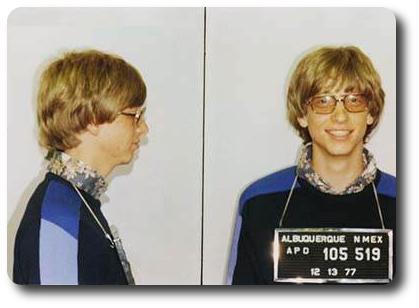
Bill Gates
Bill Gates arrested in his younger days (photo in public domain)

From previously-cited writer comes yet another ‘killer essay’.

if (Windows Rules) then (Linux fails)

Part of the problem with the documentation and identification issues I talked about last week – and will talk about more later – is that it is very hard to separate information from disinformation.

Disinformation comes in three major forms:

  1. innocent mistakes;
  2. intentional disinformation (aka FUD); and,
  3. (self) delusion.

[...]

Read on…

Also see: Linux is not Windows

RAID Redundancy

Servers stack

RAID stands for Redundant Array of Independent (or Inexpensive) Disks. As yet, I find RAID somewhat redundant, at least in my individual scenarios and for my personal purposes.

RAID is associated with backups on multiple disks, which in turn enables easy data recovery. The disks may also be distributed across geographically isolated and thus independent places. RAID does not directly cater for synchronation of data, applications, settings. That, for instance, is one of the powers of on-line services and network-hosted environments. This, as a matter of fact, is what pushes computers towards becoming relics.

One question to consider in RAID is the target of a write/read operations. This point refers to where data should be fetched from or save onto and how changes should propagated among the multiple disks. These issues are easily resolved in the following way:

Let us look at this conundrum, which is flawless management of files across computers. The confusion over where data gets stored and fetched from can be resolved owing to remote login. Assuming we speak of high-bandwidth networks here (100Mbit LAN in my case), the ‘cost’ of using SSH bandwidth is almost negligible. Even 10Mbit connections would give you a very responsive UI behaviour over the network. I know this because I tried it. The exception are cases where you stream many large frames over the network (e.g. video, games).

I have never looked deep into RAID technologies. Why not just scp (or rsync) the entire content of a hard-drive periodically? I maintain files on just a single machine, which I always SSH to from elsewhere. Its contents get mirrored on two other remote machines. Files that change on a daily basis are backed on the SAN overnight using cron jobs. This simplifies life a great deal. I still see no compelling reason for using RAID, especially with the existence high-speed networks.

As for Web site backups, these can conveniently be downloaded unless an automated job is set up, which is something I hope to do one day.

Related short items:

Multi-file and Single-file Presentations

MIAS IRC presentation
An example multi-file, Web-based presentation (click to start)

RENCENTLY, I have being passively swayed (“forced” rather) towards using WYSIWYG applications for composition of a presentation. I have done that as a teenager, but I sure know the issues associated with the paradigm. I use OpenOffice at the moment, in conjuction with colleagues who stubbornly stick to PowerPoint.

As sad as this may sound, it seems obvious that, judging by the large, conferences do not accept presentations in formats such as HTML, even if they are as advanced and rich as S5 (exemplified above). Many conference them make PowerPoint the sole option, thus snubbing anybody who does not use Windows or is unwilling to invest in expensive licences that lead to vendor lock-in. Fortunately, I work in O/S-tolerant environments, so I rarely need to suffer from such narrow-mindedness.

WYSIWYG is a good paradigm in principle. Alas, as explained several times in the past (e.g. Dangers of Abstraction), WYSIWYG tends to be lossy. Also, re-use becomes as serious problem; searching and indexing likewise. The idea of encapsulating objects like arrows and circles in a single file, along with videos, images and text is ‘unhealthy’ to say the least. A binary presentation is not one which is open for standards-based tools to interpret. It is also poorly-structured.

OpenDocument does not make it trivial for one to extract individual objects unless various tools are used. Therefore, I am reluctant to ever use OpenOffice and yet I recommend and promote it. Hypocrisy? I say “nay”. Its entry barrier is low, and if not the cost, then open formats should make the difference and end the vendor/product dependency. OpenOffice will never suffer from the same pitfalls Microsoft vainly ignore.

An HTML presentation has its text stored separately (under e.g. index.html). Additionally, there are videos and graphics as individual files in their own isolated directory. The technology which drives S5, as in this particular case, involves a collection of stylesheets which are easily exchangeable, interchangeable, and are stored aside, together with their associated graphics. Lastly, there is JavaScript to integrates this technology and make keyboard navigation, buttons and the like a practical reality.

To finish off with a rant, why is it that ‘simplicity’ ended up attaining a huge tar-like file which is obscure in terms of its content? If it were not for Microsoft Office, would somebody else have done the same? Some time ago I heard that Office files were bound to become a compressed files which contain all the peripheral files, e.g. images and graphs, completely apart. XML is frequently echoed by the media in this context. Could this be related to Microsoft’s recent proposal to open up their formats?

Retrieval statistics: 21 queries taking a total of 0.583 seconds • Please report low bandwidth using the feedback form
Original styles created by Ian Main (all acknowledgements) • PHP scripts and styles later modified by Roy Schestowitz • Help yourself to a GPL'd copy
|— Proudly powered by W o r d P r e s s — based on a heavily-hacked version 1.2.1 (Mingus) installation —|