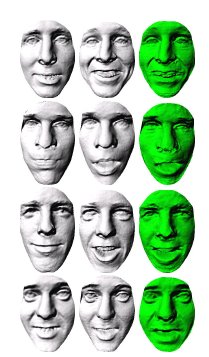
Expressions Data in FRGC 2.0 (3-D)
 Filed under:
  recently needed to gather 3-D data of different people’s faces, in order to perform experiments on these and test new algorithms that I had developed. The problem was, without some metadata regarding expressions, how might I find correct pairs suiting a particular criterion/ia? Two universities that I contacted had some data of this kind, but they were unwilling to share it (Open Data principles betrayed). So I had to do it myself using a dataset I mentioned here before [1, 2]. So far I have covered smiles and since it takes a lot of time to achieve this, I would like to share my work with those pursuing similar data.
To proactively remove allegations of the set being too easy to deal with (picky-ness in peer review), the most difficult partition when it comes to acquisition quality is taken. The figure below shows some examples of pairs that are being used after being selected as not many images contain expression variation. The selection process of very tedious as very few 3-D images exist with expressions in them, especially ones from the same person (required for consistent training assuming intra-subject residues are alike for common expressions).
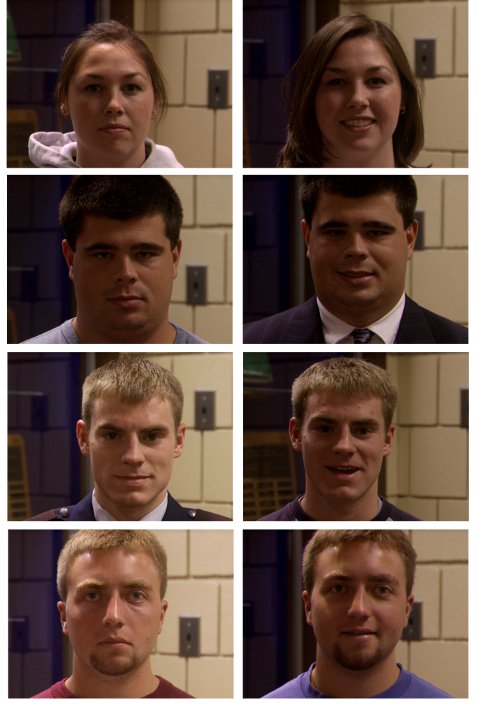
Examples of the faces used tor training and recognition, with neutrals on the left and smiles on the right (note: this is just the texture of 3-D images)
About 5 hours were spent classifying the NIST datasets for future experiments. An initial subset of it is put in loader files. From the whole 3-D data of the Face Recognition Grand Challenge, one can only find a few hundreds of distinct individuals. Not all of them have an acquisition with a smile. I found just over 80 by manually browsing everything and some will be hard to work with due to obvious cases of degraded signal. The criteria was that all parts of the face (mouth upwards) must be visible and the expression one of happiness, not necessarily a smile.
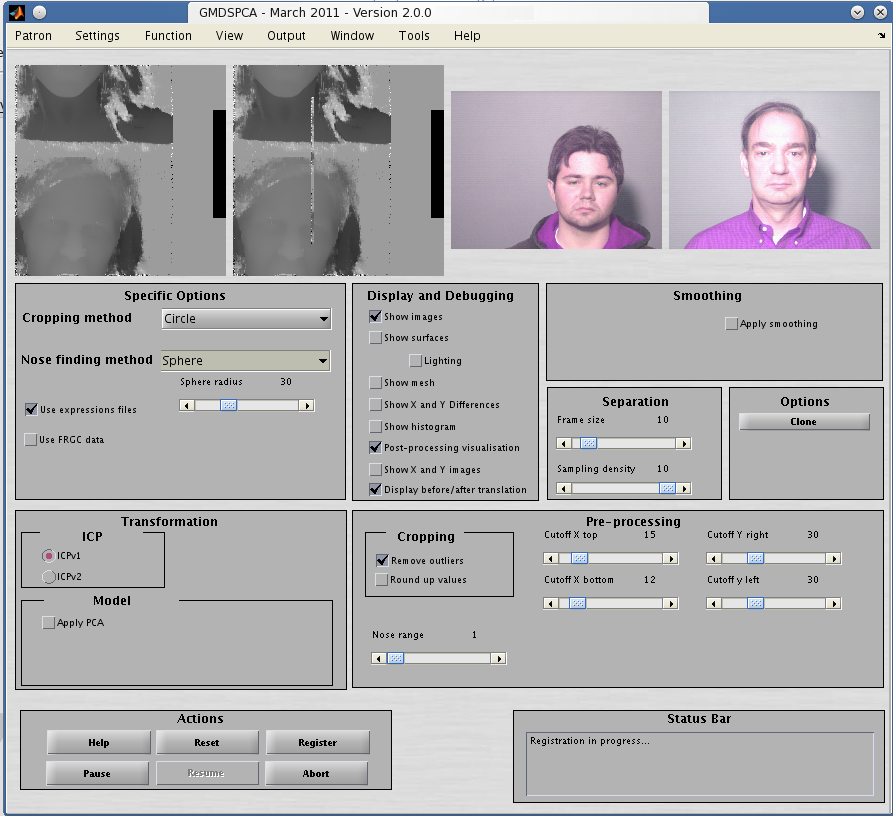
The program works reasonably well (see the figure below) with new implementations of ICP (there are two main ones from my research group) and the new data which comprises 86 pairs, or 172 images in total.
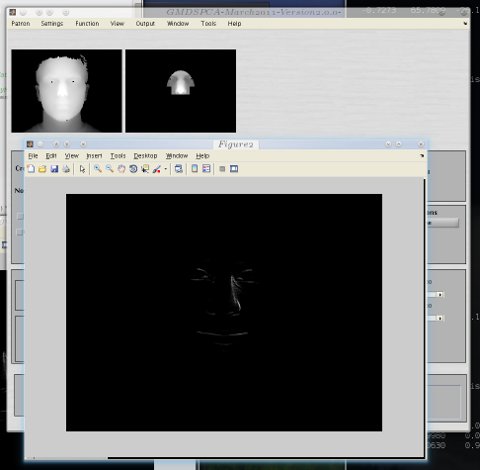
Examples of the program with the new data and methods in place
Here is the statement for loading the pairs of expressions in GNU Octave or in MATLAB, in case someone needs a large pile of gigabytes of consistent expressions data.
    images_list={'neutral'
  ;'~/NIST/FRGC-2.0-dist/nd1/Fall2003range/04471d273.abs'


  ;'smile'
  ;'~/NIST/FRGC-2.0-dist/nd1/Fall2003range/04471d271.abs'


  ;'neutral'
  ;'~/NIST/FRGC-2.0-dist/nd1/Fall2003range/04472d226.abs'


  ;'smile'
  ;'~/NIST/FRGC-2.0-dist/nd1/Fall2003range/04472d230.abs'


  ;'neutral'
  ;'~/NIST/FRGC-2.0-dist/nd1/Fall2003range/04473d185.abs'


  ;'smile'
  ;'~/NIST/FRGC-2.0-dist/nd1/Fall2003range/04473d193.abs'


  ;'neutral'
  ;'~/NIST/FRGC-2.0-dist/nd1/Fall2003range/04479d222.abs'


  ;'smile'
  ;'~/NIST/FRGC-2.0-dist/nd1/Fall2003range/04479d224.abs'


  ;'neutral'
  ;'~/NIST/FRGC-2.0-dist/nd1/Fall2003range/04484d189.abs'


  ;'smile'
  ;'~/NIST/FRGC-2.0-dist/nd1/Fall2003range/04484d191.abs'


  ;'neutral'
  ;'~/NIST/FRGC-2.0-dist/nd1/Fall2003range/04485d290.abs'


  ;'smile'
  ;'~/NIST/FRGC-2.0-dist/nd1/Fall2003range/04485d292.abs'

  ;'neutral'
  ;'~/NIST/FRGC-2.0-dist/nd1/Fall2003range/04488d286.abs'

  ;'smile'
  ;'~/NIST/FRGC-2.0-dist/nd1/Fall2003range/04488d288.abs'


  ;'neutral'
  ;'~/NIST/FRGC-2.0-dist/nd1/Fall2003range/04495d313.abs'

  ;'smile'
  ;'~/NIST/FRGC-2.0-dist/nd1/Fall2003range/04495d317.abs'


  ;'neutral'
  ;'~/NIST/FRGC-2.0-dist/nd1/Fall2003range/04496d246.abs'

  ;'smile'
  ;'~/NIST/FRGC-2.0-dist/nd1/Fall2003range/04496d250.abs'


  ;'neutral'
  ;'~/NIST/FRGC-2.0-dist/nd1/Fall2003range/04502d60.abs'

  ;'smile'
  ;'~/NIST/FRGC-2.0-dist/nd1/Fall2003range/04502d58.abs'


  ;'neutral'
  ;'~/NIST/FRGC-2.0-dist/nd1/Fall2003range/04505d218.abs'

  ;'smile'
  ;'~/NIST/FRGC-2.0-dist/nd1/Fall2003range/04505d224.abs'


  ;'neutral'
  ;'~/NIST/FRGC-2.0-dist/nd1/Fall2003range/04507d309.abs'

  ;'smile'
  ;'~/NIST/FRGC-2.0-dist/nd1/Fall2003range/04507d305.abs'


  ;'neutral'
  ;'~/NIST/FRGC-2.0-dist/nd1/Fall2003range/04509d276.abs'

  ;'smile'
  ;'~/NIST/FRGC-2.0-dist/nd1/Fall2003range/04509d282.abs'


  ;'neutral'
  ;'~/NIST/FRGC-2.0-dist/nd1/Fall2003range/04508d83.abs'

  ;'smile'
  ;'~/NIST/FRGC-2.0-dist/nd1/Fall2003range/04508d85.abs'


  ;'neutral'
  ;'~/NIST/FRGC-2.0-dist/nd1/Fall2003range/04511d178.abs'

  ;'smile'
  ;'~/NIST/FRGC-2.0-dist/nd1/Fall2003range/04511d176.abs'


  ;'neutral'
  ;'~/NIST/FRGC-2.0-dist/nd1/Fall2003range/04514d326.abs'

  ;'smile'
  ;'~/NIST/FRGC-2.0-dist/nd1/Fall2003range/04514d328.abs'


  ;'neutral'
  ;'~/NIST/FRGC-2.0-dist/nd1/Fall2003range/04513d303.abs'

  ;'smile'
  ;'~/NIST/FRGC-2.0-dist/nd1/Fall2003range/04513d309.abs'


  ;'neutral'
  ;'~/NIST/FRGC-2.0-dist/nd1/Fall2003range/04530d321.abs'

  ;'smile'
  ;'~/NIST/FRGC-2.0-dist/nd1/Fall2003range/04530d323.abs'


  ;'neutral'
  ;'~/NIST/FRGC-2.0-dist/nd1/Fall2003range/04519d204.abs'

  ;'smile'
  ;'~/NIST/FRGC-2.0-dist/nd1/Fall2003range/04519d210.abs'

  ;'neutral'
  ;'~/NIST/FRGC-2.0-dist/nd1/Fall2003range/04531d297.abs'

  ;'smile'
  ;'~/NIST/FRGC-2.0-dist/nd1/Fall2003range/04531d295.abs'


  ;'neutral'
  ;'~/NIST/FRGC-2.0-dist/nd1/Fall2003range/04537d328.abs'

  ;'smile'
  ;'~/NIST/FRGC-2.0-dist/nd1/Fall2003range/04537d330.abs'


  ;'neutral'
  ;'~/NIST/FRGC-2.0-dist/nd1/Fall2003range/04535d213.abs'

  ;'smile'
  ;'~/NIST/FRGC-2.0-dist/nd1/Fall2003range/04535d217.abs'


  ;'neutral'
  ;'~/NIST/FRGC-2.0-dist/nd1/Fall2003range/04546d75.abs'

  ;'smile'
  ;'~/NIST/FRGC-2.0-dist/nd1/Fall2003range/04546d71.abs'


  ;'neutral'
  ;'~/NIST/FRGC-2.0-dist/nd1/Fall2003range/04542d118.abs'

  ;'smile'
  ;'~/NIST/FRGC-2.0-dist/nd1/Fall2003range/04542d114.abs'


  ;'neutral'
  ;'~/NIST/FRGC-2.0-dist/nd1/Fall2003range/04556d311.abs'

  ;'smile'
  ;'~/NIST/FRGC-2.0-dist/nd1/Fall2003range/04556d315.abs'


  ;'neutral'
  ;'~/NIST/FRGC-2.0-dist/nd1/Fall2003range/04557d337.abs'


  ;'smile'
  ;'~/NIST/FRGC-2.0-dist/nd1/Fall2003range/04557d339.abs'

  ;'neutral'
  ;'~/NIST/FRGC-2.0-dist/nd1/Fall2003range/04559d314.abs'


  ;'smile'
  ;'~/NIST/FRGC-2.0-dist/nd1/Fall2003range/04559d320.abs'

  ;'neutral'
  ;'~/NIST/FRGC-2.0-dist/nd1/Fall2003range/04560d273.abs'


  ;'smile'
  ;'~/NIST/FRGC-2.0-dist/nd1/Fall2003range/04560d275.abs'


  ;'neutral'
  ;'~/NIST/FRGC-2.0-dist/nd1/Fall2003range/04569d288.abs'

  ;'smile'
  ;'~/NIST/FRGC-2.0-dist/nd1/Fall2003range/04569d286.abs'


  ;'neutral'
  ;'~/NIST/FRGC-2.0-dist/nd1/Fall2003range/04577d290.abs'

  ;'smile'
  ;'~/NIST/FRGC-2.0-dist/nd1/Fall2003range/04577d292.abs'


  ;'neutral'
  ;'~/NIST/FRGC-2.0-dist/nd1/Fall2003range/04580d299.abs'

  ;'smile'
  ;'~/NIST/FRGC-2.0-dist/nd1/Fall2003range/04580d307.abs'


  ;'neutral'
  ;'~/NIST/FRGC-2.0-dist/nd1/Fall2003range/04581d200.abs'

  ;'smile'
  ;'~/NIST/FRGC-2.0-dist/nd1/Fall2003range/04581d202.abs'


  ;'neutral'
  ;'~/NIST/FRGC-2.0-dist/nd1/Fall2003range/04588d137.abs'

  ;'smile'
  ;'~/NIST/FRGC-2.0-dist/nd1/Fall2003range/04588d135.abs'


  ;'neutral'
  ;'~/NIST/FRGC-2.0-dist/nd1/Fall2003range/04589d246.abs'

  ;'smile'
  ;'~/NIST/FRGC-2.0-dist/nd1/Fall2003range/04589d248.abs'


  ;'neutral'
  ;'~/NIST/FRGC-2.0-dist/nd1/Fall2003range/04593d200.abs'

  ;'smile'
  ;'~/NIST/FRGC-2.0-dist/nd1/Fall2003range/04593d202.abs'


  ;'neutral'
  ;'~/NIST/FRGC-2.0-dist/nd1/Fall2003range/04595d93.abs'

  ;'smile'
  ;'~/NIST/FRGC-2.0-dist/nd1/Fall2003range/04595d95.abs'


  ;'neutral'
  ;'~/NIST/FRGC-2.0-dist/nd1/Fall2003range/04596d78.abs'

  ;'smile'
  ;'~/NIST/FRGC-2.0-dist/nd1/Fall2003range/04596d84.abs'


  ;'neutral'
  ;'~/NIST/FRGC-2.0-dist/nd1/Fall2003range/04600d249.abs'

  ;'smile'
  ;'~/NIST/FRGC-2.0-dist/nd1/Fall2003range/04600d251.abs'


  ;'neutral'
  ;'~/NIST/FRGC-2.0-dist/nd1/Fall2003range/04603d141.abs'

  ;'smile'
  ;'~/NIST/FRGC-2.0-dist/nd1/Fall2003range/04603d143.abs'


  ;'neutral'
  ;'~/NIST/FRGC-2.0-dist/nd1/Fall2003range/04605d243.abs'

  ;'smile'
  ;'~/NIST/FRGC-2.0-dist/nd1/Fall2003range/04605d239.abs'


  ;'neutral'
  ;'~/NIST/FRGC-2.0-dist/nd1/Fall2003range/04609d98.abs'

  ;'smile'
  ;'~/NIST/FRGC-2.0-dist/nd1/Fall2003range/04609d100.abs'


  ;'neutral'
  ;'~/NIST/FRGC-2.0-dist/nd1/Fall2003range/04606d180.abs'

  ;'smile'
  ;'~/NIST/FRGC-2.0-dist/nd1/Fall2003range/04606d182.abs'


  ;'neutral'
  ;'~/NIST/FRGC-2.0-dist/nd1/Fall2003range/04605d255.abs'

  ;'smile'
  ;'~/NIST/FRGC-2.0-dist/nd1/Fall2003range/04605d253.abs'


  ;'neutral'
  ;'~/NIST/FRGC-2.0-dist/nd1/Fall2003range/04622d238.abs'

  ;'smile'
  ;'~/NIST/FRGC-2.0-dist/nd1/Fall2003range/04622d240.abs'


  ;'neutral'
  ;'~/NIST/FRGC-2.0-dist/nd1/Fall2003range/04619d163.abs'

  ;'smile'
  ;'~/NIST/FRGC-2.0-dist/nd1/Fall2003range/04619d161.abs'


  ;'neutral'
  ;'~/NIST/FRGC-2.0-dist/nd1/Fall2003range/04629d144.abs'

  ;'smile'
  ;'~/NIST/FRGC-2.0-dist/nd1/Fall2003range/04629d146.abs'


  ;'neutral'
  ;'~/NIST/FRGC-2.0-dist/nd1/Fall2003range/04644d204.abs'

  ;'smile'
  ;'~/NIST/FRGC-2.0-dist/nd1/Fall2003range/04644d206.abs'


  ;'neutral'
  ;'~/NIST/FRGC-2.0-dist/nd1/Fall2003range/04645d95.abs'

  ;'smile'
  ;'~/NIST/FRGC-2.0-dist/nd1/Fall2003range/04645d93.abs'


  ;'neutral'
  ;'~/NIST/FRGC-2.0-dist/nd1/Fall2003range/04697d80.abs'

  ;'smile'
  ;'~/NIST/FRGC-2.0-dist/nd1/Fall2003range/04697d78.abs'


  ;'neutral'
  ;'~/NIST/FRGC-2.0-dist/nd1/Fall2003range/04696d40.abs'

  ;'smile'
  ;'~/NIST/FRGC-2.0-dist/nd1/Fall2003range/04696d42.abs'


  ;'neutral'
  ;'~/NIST/FRGC-2.0-dist/nd1/Fall2003range/04691d50.abs'

  ;'smile'
  ;'~/NIST/FRGC-2.0-dist/nd1/Fall2003range/04691d48.abs'


  ;'neutral'
  ;'~/NIST/FRGC-2.0-dist/nd1/Fall2003range/04688d40.abs'

  ;'smile'
  ;'~/NIST/FRGC-2.0-dist/nd1/Fall2003range/04688d36.abs'


  ;'neutral'
  ;'~/NIST/FRGC-2.0-dist/nd1/Fall2003range/04684d232.abs'

  ;'smile'
  ;'~/NIST/FRGC-2.0-dist/nd1/Fall2003range/04684d234.abs'


  ;'neutral'
  ;'~/NIST/FRGC-2.0-dist/nd1/Fall2003range/04682d122.abs'

  ;'smile'
  ;'~/NIST/FRGC-2.0-dist/nd1/Fall2003range/04682d128.abs'


  ;'neutral'
  ;'~/NIST/FRGC-2.0-dist/nd1/Fall2003range/04675d251.abs'

  ;'smile'
  ;'~/NIST/FRGC-2.0-dist/nd1/Fall2003range/04675d253.abs'


  ;'neutral'
  ;'~/NIST/FRGC-2.0-dist/nd1/Fall2003range/04673d188.abs'

  ;'smile'
  ;'~/NIST/FRGC-2.0-dist/nd1/Fall2003range/04673d190.abs'


  ;'neutral'
  ;'~/NIST/FRGC-2.0-dist/nd1/Fall2003range/04699d42.abs'

  ;'smile'
  ;'~/NIST/FRGC-2.0-dist/nd1/Fall2003range/04699d44.abs'


  ;'neutral'
  ;'~/NIST/FRGC-2.0-dist/nd1/Fall2003range/04700d18.abs'

  ;'smile'
  ;'~/NIST/FRGC-2.0-dist/nd1/Fall2003range/04700d20.abs'


  ;'neutral'
  ;'~/NIST/FRGC-2.0-dist/nd1/Fall2003range/04703d46.abs'

  ;'smile'
  ;'~/NIST/FRGC-2.0-dist/nd1/Fall2003range/04703d42.abs'


  ;'neutral'
  ;'~/NIST/FRGC-2.0-dist/nd1/Fall2003range/04704d22.abs'

  ;'smile'
  ;'~/NIST/FRGC-2.0-dist/nd1/Fall2003range/04704d18.abs'


  ;'neutral'
  ;'~/NIST/FRGC-2.0-dist/nd1/Fall2003range/04711d53.abs'

  ;'smile'
  ;'~/NIST/FRGC-2.0-dist/nd1/Fall2003range/04711d47.abs'


  ;'neutral'
  ;'~/NIST/FRGC-2.0-dist/nd1/Fall2003range/04715d12.abs'

  ;'smile'
  ;'~/NIST/FRGC-2.0-dist/nd1/Fall2003range/04715d14.abs'


  ;'neutral'
  ;'~/NIST/FRGC-2.0-dist/nd1/Fall2003range/04717d49.abs'

  ;'smile'
  ;'~/NIST/FRGC-2.0-dist/nd1/Fall2003range/04717d43.abs'


  ;'neutral'
  ;'~/NIST/FRGC-2.0-dist/nd1/Fall2003range/04719d86.abs'

  ;'smile'
  ;'~/NIST/FRGC-2.0-dist/nd1/Fall2003range/04719d88.abs'


  ;'neutral'
  ;'~/NIST/FRGC-2.0-dist/nd1/Fall2003range/04721d48.abs'

  ;'smile'
  ;'~/NIST/FRGC-2.0-dist/nd1/Fall2003range/04721d46.abs'


  ;'neutral'
  ;'~/NIST/FRGC-2.0-dist/nd1/Fall2003range/04728d44.abs'

  ;'smile'
  ;'~/NIST/FRGC-2.0-dist/nd1/Fall2003range/04728d42.abs'


  ;'neutral'
  ;'~/NIST/FRGC-2.0-dist/nd1/Fall2003range/04737d38.abs'

  ;'smile'
  ;'~/NIST/FRGC-2.0-dist/nd1/Fall2003range/04737d36.abs'


  ;'neutral'
  ;'~/NIST/FRGC-2.0-dist/nd1/Fall2003range/04737d38.abs'

  ;'smile'
  ;'~/NIST/FRGC-2.0-dist/nd1/Fall2003range/04737d36.abs'


  ;'neutral'
  ;'~/NIST/FRGC-2.0-dist/nd1/Fall2003range/04749d80.abs'

  ;'smile'
  ;'~/NIST/FRGC-2.0-dist/nd1/Fall2003range/04749d82.abs'


  ;'neutral'
  ;'~/NIST/FRGC-2.0-dist/nd1/Fall2003range/04750d54.abs'

  ;'smile'
  ;'~/NIST/FRGC-2.0-dist/nd1/Fall2003range/04750d56.abs'


  ;'neutral'
  ;'~/NIST/FRGC-2.0-dist/nd1/Fall2003range/04754d78.abs'

  ;'smile'
  ;'~/NIST/FRGC-2.0-dist/nd1/Fall2003range/04754d80.abs'


  ;'neutral'
  ;'~/NIST/FRGC-2.0-dist/nd1/Fall2003range/04756d73.abs'

  ;'smile'
  ;'~/NIST/FRGC-2.0-dist/nd1/Fall2003range/04756d75.abs'


  ;'neutral'
  ;'~/NIST/FRGC-2.0-dist/nd1/Fall2003range/04762d43.abs'

  ;'smile'
  ;'~/NIST/FRGC-2.0-dist/nd1/Fall2003range/04762d41.abs'


  ;'neutral'
  ;'~/NIST/FRGC-2.0-dist/nd1/Fall2003range/04763d68.abs'

  ;'smile'
  ;'~/NIST/FRGC-2.0-dist/nd1/Fall2003range/04763d70.abs'


  ;'neutral'
  ;'~/NIST/FRGC-2.0-dist/nd1/Fall2003range/04766d24.abs'

  ;'smile'
  ;'~/NIST/FRGC-2.0-dist/nd1/Fall2003range/04766d30.abs'


  ;'neutral'
  ;'~/NIST/FRGC-2.0-dist/nd1/Fall2003range/04767d38.abs'

  ;'smile'
  ;'~/NIST/FRGC-2.0-dist/nd1/Fall2003range/04767d36.abs'


  ;'neutral'
  ;'~/NIST/FRGC-2.0-dist/nd1/Fall2003range/04768d76.abs'

  ;'smile'
  ;'~/NIST/FRGC-2.0-dist/nd1/Fall2003range/04768d74.abs'


  ;'neutral'
  ;'~/NIST/FRGC-2.0-dist/nd1/Fall2003range/04773d84.abs'

  ;'smile'
  ;'~/NIST/FRGC-2.0-dist/nd1/Fall2003range/04773d78.abs'


  ;'neutral'
  ;'~/NIST/FRGC-2.0-dist/nd1/Fall2003range/04775d80.abs'

  ;'smile'
  ;'~/NIST/FRGC-2.0-dist/nd1/Fall2003range/04775d82.abs'


  ;'neutral'
  ;'~/NIST/FRGC-2.0-dist/nd1/Fall2003range/04777d88.abs'

  ;'smile'
  ;'~/NIST/FRGC-2.0-dist/nd1/Fall2003range/04777d84.abs'


  ;'neutral'
  ;'~/NIST/FRGC-2.0-dist/nd1/Fall2003range/04779d52.abs'

  ;'smile'
  ;'~/NIST/FRGC-2.0-dist/nd1/Fall2003range/04779d48.abs'


  ;'neutral'
  ;'~/NIST/FRGC-2.0-dist/nd1/Fall2003range/04805d60.abs'

  ;'smile'
  ;'~/NIST/FRGC-2.0-dist/nd1/Fall2003range/04805d62.abs'


  ;'neutral'
  ;'~/NIST/FRGC-2.0-dist/nd1/Fall2003range/04808d32.abs'

  ;'smile'
  ;'~/NIST/FRGC-2.0-dist/nd1/Fall2003range/04808d30.abs'


  ;'neutral'
  ;'~/NIST/FRGC-2.0-dist/nd1/Fall2003range/04821d44.abs'

  ;'smile'
  ;'~/NIST/FRGC-2.0-dist/nd1/Fall2003range/04820d36.abs'


  ;'neutral'
  ;'~/NIST/FRGC-2.0-dist/nd1/Fall2003range/04836d47.abs'

  ;'smile'
  ;'~/NIST/FRGC-2.0-dist/nd1/Fall2003range/04836d49.abs'


  ;'neutral'
  ;'~/NIST/FRGC-2.0-dist/nd1/Fall2003range/04853d50.abs'

  ;'smile'
  ;'~/NIST/FRGC-2.0-dist/nd1/Fall2003range/04853d48.abs'};
Later on I am going to publish all the code and about 100 pages of text. It needs tidying up first.



 arlier this month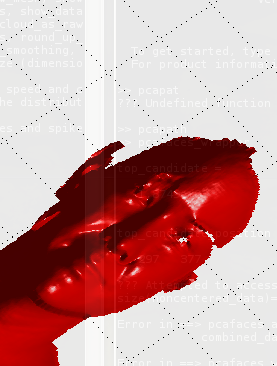


 HIS post provides some information of interest to those who may find themselves working with 70 GB of data and some programs [