Monday, July 4th, 2016, 8:21 am
Brexit in One Picture
 Filed under: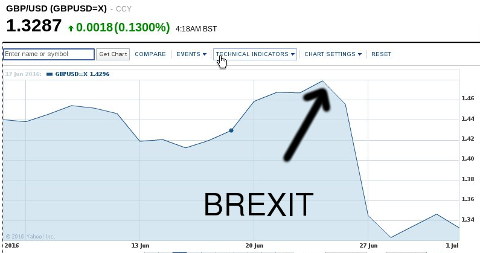


|
|


Navigation |
Summary: New interview with Robin “Roblimo” Miller on behalf of FOSSForce
 ike most people*, over the years my online posting habits change and sites I was once active in I no longer access (some no longer exist at all). This differs from person to person. I used to be very active in newsgroups and in mailing lists (that was about a decade ago), but I no longer use these much. I try to use self-hosted blogs where possible, but sometimes, due to social dynamics, I also reluctantly send copies to larger networks with more people in them. It makes my messages more widely accessible to a broader audience.
I had a great time chatting with someone this weekend, whereupon I realised that some people don’t know where to follow me, or how to limit what they follow from me, based on preferences like Linux only, no politics, patents only, personal matters and so on. Here are the links to where I can be followed online in real time, so to speak.
For Linux news I use (along with my wife):
For a mix of everything (politics included):
News and focus on patents:
Personal site:
Blog:
______
* Even those whose online activity mostly revolves around posting (uploading) selfies and pressing “like” on other people’s selfies, FWIW.

 early a fortnight ago Wilko’s ATM stole my money and many hours of work later (and some major inconveniences other than loss of time and money) the issue remains uncorrected. A week ago I wrote about my second visit to the store. The manager gave me a call but was unable to offer a satisfactory solution, still just offering a bunch of forms for me to fill in or me visiting my own bank rather than the ATM suppliers fixing their own error (which they can see). I asked to escalate this, having spoken to their customer services people, but they were delaying if not stonewalling until I repeated myself several times. Here are the chat logs:
Dr. Roy Schestowitz
The mistake was made not by your bank but a faulty machine of yours, I shall protest against your very poor handling of this situation
Jun 3
Dr. Roy Schestowitz
I have begun writing articles about my experiences with your company. This is the first: Wilko (UK) Uses Faulty ATMs that Crash, Will ‘Steal’ Money and Then Wilko Will Lie and Divert, Not Even Naming the ATM Supplier https://schestowitz.com/Weblog/archives/2016/06/03/wilko-atm-faulty/ …
Jun 3
Dr. Roy Schestowitz
I’ll have to contact he authorities and ask them to revoke the rights of #dcpayments #infocash to have ATMs out there. Unfit for purpose.
Jun 7
Dr. Roy Schestowitz
In the mean time, please provide me with contact details (email or phone) for Nick’s bosses. I would like to make a formal complaint.
Jun 7
Dr. Roy Schestowitz
please provide me with contact details (email or phone) for Nick’s bosses. I would like to make a formal complaint.
Jun 8
Dr. Roy Schestowitz
please provide me with contact details (email or phone) for Nick’s bosses. I would like to make a formal complaint.
Jun 8
Wilko
Hi, please can you confirm what this is regarding to see can ensure this is dealt with correctly. Alternatively, please contact our customer care department on 08000 329 329 and they will assist you further 
Jun 8
Dr. Roy Schestowitz
This is regarding DCPayments (Infocash) and the way management at the Wilko store in Manchester dealt with their machine’s fault. I need contact details (E-mail/Tel) for central management, not local branch (I don’t trust the Arndale staff anymore, having spent an hour speaking to them in person on a couple of visits and still not getting the issue properly tackled to its full depth). I wish to escalate this to central management. Please provide me with the E-mail address. Kind regards, Roy.
Jun 8
Wilko
We would like to pass your contact number to the regional manager for the store so that they may contact you further.
Please can you provide a contact number so that we may pass this on for you? thanks, [redacted name].
Jun 9
Dr. Roy Schestowitz
[redacted number]
Wilko
We have passed your contact details to the regional manager and they will contact you further to discuss this. Thanks, [redacted].
Jun 10
That was more than a day ago (Friday) and I still haven’t received a phonecall. They never give me numbers, they just take my own number and then rarely call. So we shall see…

 ESTERDAY I ranted about my experiences with Wilko. This rant came after wasting no less than 3 days without making progress, so I wasn’t so trigger-happy. In fact, I was patient and polite all along. I was trying to be understanding. I am still polite, but obviously my rants are becoming more disruptive to Wilko, as my messages — I am told — now circulate at management level and they try to find a solution. I haven’t received the money that was ‘stolen’ from me (yet) and it’s no longer about money. It’s about a lot more than that. Had Wilko dealt with the faults of DCPayments more properly, things would be smooth and trivial for everyone. There are two parties at fault: DCPayments (of Infocash) and Wilko. The audio below explains why.
In the previous post about it I explained what had happened and shared some correspondence for the record. When I came to the store today (especially for that I had to go to Town) I was greeted by a nice lady who said she had heard about this or remembered me.
This was not the person whom I needed to speak to (I asked for management), so I was then escalated to another non-manager. She wanted me to have a bunch of forms to fill out, as if the issues are indeed quite frequent (they seem prepared for this). But still, this is not what I asked for. Here is the short conversation:
I declined to waste my time doing this and asked to speak to the manager, who turned up several minutes later and took me for a discussion at the corner (further away from clients). I needed to be escalated to the third level to speak to this manager, who was the person I was there to see in the first place. That’s the same thing which happened last time (several escalations needed). The main conversation was with him and it was amicable. Some bits were rather revealing (about what had been going behind the scenes, so to speak).
Personal lesson learned from this: record staff you speak to as they tend to lie afterwards (to cover their behind) about what they had said. This is actually the first time that I use a recording device in such a circumstance. I have never done this before. In the audio, as I pointed out, there is an alternation of what was said by the previous manager I spoke to (regarding going to the bank), or maybe an alternation of what she had said by the second manager (‘broken telephone’). He said that Wilko had 400 such machines and defended their robustness. This turned out to be a weak argument as towards the end he admitted that he himself had experienced an issue with the machines.
I am supposed to hear back by Tuesday about what happened and what happens next.
I only found out the name of the supplier, DCPayments, after I had gotten back home and looked up Infocash. Wilko never gave me the name of the supplier, or only gave it begrudgingly at the end (saying I can find the name on the machine, which sports the “Wilko” logo).
 ILKO’s ATMs have a reputation for being a piece of rubbish. Quite often when I come to the shop members of staff kindly ask people not to use these, so what’s the point having them there in the first place? These machines are so amateur that one can, in principle, pretty easily pull the power cord or the Ethernet cable out, essentially pulling the plug on the machines. That’s how insecure these pieces of trash are. But worse — there are apparently lots of software bugs in there (these are often not operational, probably because something made them crash earlier in the day) and earlier this week I became a victim of one and lost money (they actually took money without giving any cash before crashing), whereupon I was transfered between no less than three members of staff (totally clueless!) before actually speaking to someone who seemed helpful. In retrospect, this manager was as useless as it can get as she made false promises (I insisted that she should pursue this and phone me if there are any issues) and now that it’s Friday the issue is still not corrected and I never received a call. I was unable to make any additional financial transactions that day due to Wilko’s error and I spent extraordinary amounts of time and effort thereafter. I also spoke to them online and it was equally useless. They’re running me around expecting me to jump through hoops before there’s any hope at all of getting my money back (the money they took and still owe me).
More than three days later I have completely run out of patience. Days of anger are just not worth it and Wilko still refuses to say which company is responsible for these buggy ATMs that are unfit for purpose. The dialogue below (with names removed) may help provide some additional context and shows how slow and useless this whole experience has been. The conversation below spans several days and at times there was radio silence from them, hence the multiple consecutive messages from me.
Dr. Roy Schestowitz:
Arndale Manchester shop, they say would correct the error and call today; not corrected, no calls
Wilko:
Hi, can you explain what has happened? I will email the Manager for a reply to your problem. would you like us to contact via email or phone once we have a response? Thanks Claire
Dr. Roy Schestowitz: I already spoke to the manager and left my number with her (“Roy”). She should phone me to explain.
Dr. Roy Schestowitz:
The error is STILL not corrected. Please tell them to phone me to explain why I need to go through all this trouble, why they fail to correct this issue, etc. otherwise I’ll do public shaming again and we’ll just stop shopping at Wilko for good.
Dr. Roy Schestowitz:
I am still require to know, aside from the huge hassle this caused and failure of staff to do their duties (the manager made false promises), which company provides these ATMs so that I can campaign to revoke its certification to operate
Wilko:
We’re sorry to read of the inconvenience this has caused you. We are currently investigating this with the store and will come back to you as soon as we have an update. Thank you
Dr. Roy Schestowitz:
48 hours later and three hours after promises (as before) I am still waiting for issue to be rectified or phonecall to be made
Wilko:
I’m sorry for your the delay, however as previously advised we are currently investigating this incident and will come back to you as soon as we have an update. Thank you
Dr. Roy Schestowitz:
Almost 72 hours later the error made by the Wilko ATM remains uncorrected and staff (managed) failed to call me as promised.
Wilko:
Good morning – please accept our apologies for the delay in responding to your message.
We are currently investigating this matter with the Arndale Store.
Are you able to confirm if you have contacted your bank about the problem you encountered?
[Redacted]
Dr. Roy Schestowitz:
I have not, they said they’re no need as they would correct the error
Dr. Roy Schestowitz:
I wish to know the name of the supplier of the ATMs at Wilko so that I can campaign to revoke their licence. Buggy, unfit for purpose.
Wilko:
We are currently unable to confirm those details however, I can arrange for a dispute form to be sent out to you.
If you could kindly confirm your address & I will arrange for this to be sent.
Thank you
[Redacted]
Dr. Roy Schestowitz:
what’s in it for me going through this lengthy process? Unless you are willing to compensate me for the trouble I had to go through that day and until now….
Wilko:
As previously advised, it would be your bank who needs to look into this further. If you would like me to send you out a dispute form then please let me know of your address and I will of course arrange this.
Thank you
[Redacted]
Dr. Roy Schestowitz:
The mistake was made not by your bank but a faulty machine of yours, I shall protest against your very poor handling of this situation
This is not over. They still owe me money, they probably need to get rid of their supplier and if they refuse to tell me the supplier’s name (apparently has lots of victims out there), I will try harder to find out myself and campaign to ensure their machines cease operation. These are not production-ready and they embarrass an otherwise fine store whose staff is obviously rather incompetent as after all this time and effort they’re still not solving the problem. Maybe the supplier of the ATMs is being unhelpful to them.
We won’t be shopping at Wilko anymore.
Palm Tungsten T introduced and made in 2002, still used nearly 14 years later
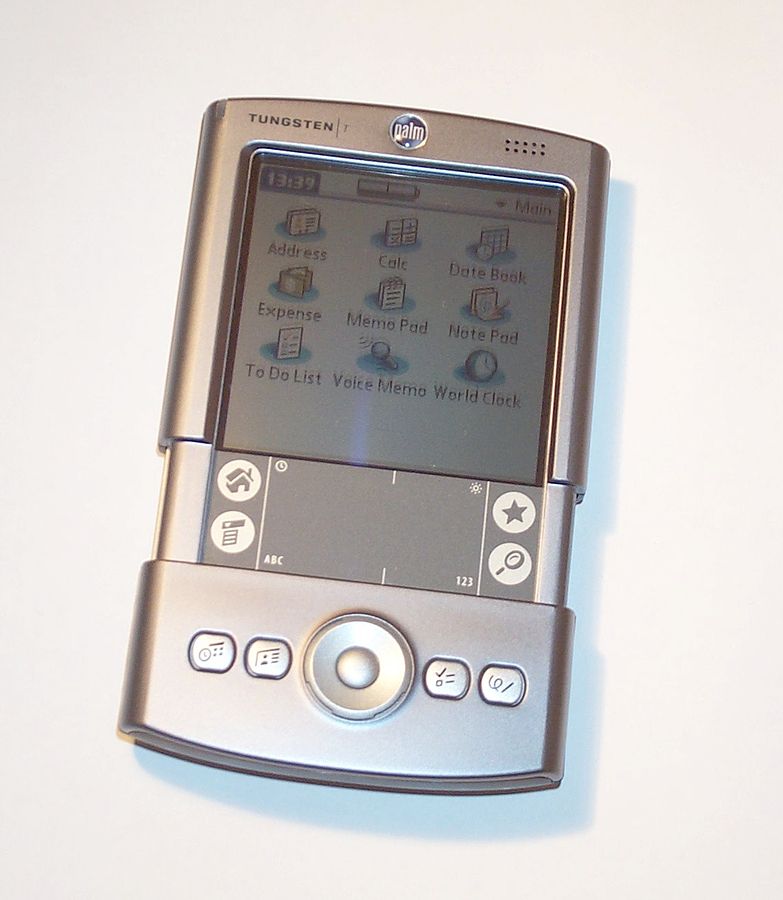
 LOSE friends of mine rightly find it hard to believe, but I still carry around with me (and regularly use) a device that’s nearly a decade and a half old. Well, newer is not always (or not necessarily) better, especially when there are habits and workflow involved.
Whenever I get asked about this I end up explaining that I use it primarily as a voice recorder and the older Tungsten was replaced by a newer (identical) one purchased in eBay a few years ago for my wife (we still have both of them and have used them both on occasions, even in tandem). Remember beaming? Yes, it still works! The truth is that the old one was not in a good enough state anymore, though battery life was OK (acceptable enough for use between daily charges).
Why make this newer purchase nearly a decade after the device was actually made? Well, the older one looked worn out after a decade’s use (almost a decade), having been carried around a lot (some bits of it no longer worked or were missing). How the eBay seller managed to keep this device in pristine condition (unused) for so long will remain a mystery. I don’t know the seller. Maybe it was kept in some attic (loft) in a home or a warehouse of some business. Maybe an unwanted gift from 2003 (ish).
What is it currently being used for? Well, I use it as a password manager with a master password (theft or loss less risky an incident this way). It stores it all (passwords) on a device without an Internet connection or a baseband OS, which makes it more secure in some ways; definitely no back doors can exist without physical access. Encryption at the storage layer on devices with back doors (usually the baseband OS is being used to hijack the principal OS, e.g. Android or iOS) is very limited as they can remotely rooted. This is widely understood these days, thanks to document leaks (mostly GCHQ) from Edward Snowden. Even the BBC covered it a couple of times in 2015.
I still occasionally use the device as an address book, though no longer much as diary/calendar. There are various ‘apps’ that come in handy as well; it is sometimes used for memos, scribbling, timing, calculations, conversions and so on.
How long will I use this Palm PDA? Judging by how long this first one lasted, it can easily last well past 2020. Even then it will remain equally secure.
Retrieval statistics: 23 queries taking a total of 0.087 seconds • Please report low bandwidth using the feedback form
Original styles created by Ian Main (all acknowledgements) • PHP scripts and styles later modified by Roy Schestowitz • Help yourself to a GPL'd copy
|— Proudly powered by W o r d P r e s s — based on a heavily-hacked version 1.2.1 (Mingus) installation —|

