Tuesday, April 4th, 2006, 10:08 am
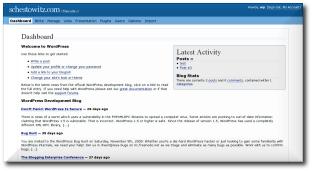
 have this sick habit, which is my tendency to keep track of bug reports I have submitted to projects. As uninteresting as it may be, here is my latest report to WordPress:
Leak’ Outside Bounding Border
[Latest nightly in use]
The appearance of the dashboard is inarguably impressive, so call it a pet peeve perhaps: I find the following box spillover somewhat of an eye sore, which should be trivial to fix. The “Write post” box is extended when the items on the left are expanded, but what about those the reside on the right-hand-side?
Local Screenshots
I sometimes feel like a bug report which is not recognised or awarded for (if not financially, then at least on a personal level), there is little or no incentive to intervene and assist further.
I must admit that I lost a fair bit of passion for WordPress development. I have been less willing to help once it began to drift onto a commercial agenda (Automattic). But as I digress, I may continue to contribute to a project whose code is GPL‘d; a project that has impact on many sites and enriches people’s on-line experience. I still feel discouraged to do more debugging when somebody else out there gets paid for it. The forum mavens have expressed similar sentiments before.
Monday, April 3rd, 2006, 11:03 pm

I thought that the following was very blog post-worthy…
How to fix your Windows Application when it doesn’t work:
(1) Stop and start the program
(2) Log in and log out again
(3) Reboot the machine
(4) Reinstall the application again
(5) Reinstall the operating system
(6) Dance naked around the machine, waving a rubber chicken
(7) “Take your machine back for servicing”
– Chris Wedgwood
Monday, April 3rd, 2006, 4:58 pm
 PELLCHECKERS have been a very fundamental tool for quite some time. However, they tend to be bundled to particular applications and the whimsical Windows XP does not even include one, unless/until Office gets installed. Below are a few observations and personal tricks, which enable the task known as spellchecking to ‘escape’ the relams of individual packages.
Firstly, let us consider Web browsers. The latest of Konqueror comes with in-line spellchecker ‘out of the box’; Firefox has plugins (notably SpellBound); I am not too sure about Opera because it contains nothing as such ‘out of the box’. Then again, I may have missed it because I use Opera no more than once a week. Internet Explorer may rely on applications like Word or Outlook (Express) for peripheral spellchecking, yet this is far from convenient.
How can the user check inserted text in merely any application? What happens when the spelling facility is out of sight? I can only present my own method, which is the use of a lightweight external program: the text editor. Copying to external editors is easy and generalisable, just as a last resort. In my case, this involves a sequence of keystrokes: [Ctrl]+A (highlight all), [Ctrl]+C (copy), [Ctrl]+E (for editor invocation), [Ctrl]+V (paste in editor), [Ctrl]+T+S (spellchecking), then [Ctrl]+A (highlight all again), [Ctrl]+C, [Ctrl]+V (paste back). It takes only a few seconds and works effectively in any application.
All in all, familiarity with keyboard accelerators is the key (pun intended), as well as setup of new accelerators, hand positioning (arms as adjacent as possible to all peripherals) and so forth. A few others could possibly attest to a similar experience.

The ‘big boys’ have some typos as well, one of which I captured
Monday, April 3rd, 2006, 1:55 pm

Season of the playful penguins from Oyonale
IBM have gradually become a close ally of Linux, as well as Open Source in general. Among the exciting news for Linux, heaps of which have flooded the mainstream in recent weeks/month:
IBM Challenges Microsoft With $300 Million Ad Campaign
At the center of the new migration initiative under Move2Lotus is “Migrate to the Penguin.” IBM is introducing a limited time only rebate program for eligible IBM Software Resellers who move customers from Microsoft Exchange to Lotus Notes and Domino on Linux collaboration offerings.
Source: technewsworld.com
Sunday, April 2nd, 2006, 6:44 pm

The Movie Timeline is a nice little project which attempts to assign a film to each event since the beginning of time. To get the general idea, here is an arbitrary snippet:
1973 Bobby Darin dies (Beyond The Sea)
New York – Penny Lane becomes a regular on the tour bus (Almost Famous)
Las Vegas – Sam “Ace” Rothstein begins running a casino (Casino)
…
Although many of the entries are humorous, Hollywood has made it possible to watch a series of films which document Earth’s history.
Saturday, April 1st, 2006, 6:36 pm
Feed readers are merely everywhere nowadays. They are especially popular among bloggers and sufferers of the information overload age. To some, feed readers have become an application whose importance is on par with that of the E-mail client and the Web browser.
In a new review of on-line feed readers (as opposed to native desktop applications) Feedlounge, which I am/was somewhat involved in, was probably one among two winners, Google being the other contender. I once mentioned Google as the primarily threat to Feedlounge — a fact that Feedlounge founder were quick to grasp. Will all readers prevail or will only a few survive?
Other reviews: A decent overview involving 10 prominent Linux distributions, even a comical review of Windows Vista
Saturday, April 1st, 2006, 8:17 am
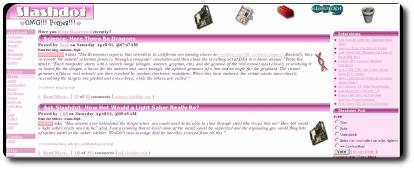
The front page of Slashdot on April 1st, 2006
 Y title is probably misleading, but Slashdot have published some rumours as news, on several occasions in the past. Their editors improve in terms of how selective they are, yet I lost some interest in Slashdot due to a fine alternative. I find more of the latest on technology over at Digg. With Digg, content tends to be more succinct, more broad and more frequently updated (albeit frauds due to slow moderation have become commonplace). Subscription to the Digg feeds is something which I strongly recommend to those who can cope with more load and want to keep abreast of the latest.


 Filed under:


