Introduction About Site Map

XML
RSS 2 Feed RSS 2 Feed
Navigation

Main Page | Blog Index

Monday, August 15th, 2005, 3:00 pm

Windows and the Placebo Effect

Orange pillsWhen a general audience observes Windows being used everywhere, it is natural to assume it is the best operating system. In reality, very few people have seen alternatives to Windows. Even fewer people had a prolonged hands-on experience with another platform. Microsoft are exploiting the placebo effect, giving unnecessary and unproductive software, which you truly think helps you, but only helps lock your data to one particular vendor. Often the vendor destroys the very same community that it pretends to cherish. One day in the future, people come to realise that better software is out there and that influence of the group has shifted its balance. But is it too late once data has been locked to a vendor and habits become less reversible?

Windows used to be a great operating system. I cannot deny it. Yet, I am thinking about 1992-1995 or thereabouts when Windows spread like fire owing to its nice tools (and piracy). It has been static in terms of productivity ever since and it is now lagging behind the competition. It has lost its edge rather quickly — something that even “the” Microsoft evangelist admitted to.

Lock-ins, proprietary and narrow-mindedness allow Windows to live longer than it truly deserves. A large number of people in newsgroups I get involved in ask about data conversions that will redeem them from Microsoft proprietary and allow them to reclaim their data. It is only then, several years later, that ex-Windows users understand that this placebo was in fact poison.

Businesses are said to always be in a state of growth or diminish. Experience shows that they can never remain static. Encouraging is that fact that Windows loses more users to other operating system than it manages to attract at the moment. Balance has shifted.

Monday, August 15th, 2005, 6:11 am

RPG Fantasy World

Laptop

Back when I was in school, some friends of mine were addicted to on-line role-playing games (RPG) such as Ultima (interview with its creator just Slashdotted). One of them would spend his entire life (not literally as he was in school too) playing D&D-themed games, attending his friends’ on-line weddings and grabbing screenshots. The Diablo extravaganza was heated up too at the time, but it goes back to the age of 14 or 15.

I have just stumbled upon an entertaining essay by one such addict. It gives an idea of the scale and growth of this phenomenon. I will not be surprised if in the next decade we see people who are entirely disconnected from reality, constantly ‘plugged-into’ their computer screen, spending their life (physical) in a virtual world, provided they can financially afford it. Computers allow many to enter a virtual world where gaps between reality and imagination simply collapse. Let us not forget that computers stride on quickly while the rest of the world does not. In a few decades, the two might intersect at some level.

You may have heard about a guy who recently was convicted of murdering a man during a dispute over a rare, valuable sword. That sword that was not made of metal or anything solid, but rather of 1′s and 0′s inside a computer hundreds of miles away. It was a sword he had won in the MMORPG Legend of Mir 3.

Related films: The Lawnmower Man (1992), The Matrix (1999)
(note: mentioning of these films does not imply that I like them)

Monday, August 15th, 2005, 4:36 am

Two Birds, One Stone

Tux of LinuxA heavily-discussed topic in this quiet August is Mac OS X piracy. Yet more sets of instructions flow in, which explain about (at least) 3 different ways of installing Mac OS X on non-Apple workstations. To give a snippet of one of them, “1 – Install Darwin 8.0.1…” and yet another: “3. Download Ubuntu Live CD…”. It becomes apparent that a Linux installation is usually, if not always, part of the installation process. It’s a pre-requisite.

OS X will supposedly require its own isolated hard-drive, which is a shame. OS X is good for many things, but not for everything so partitioning would have been a pro. Only 2 days ago I formatted one of my partitions. I would have loved to make it an OS X partition, but I ended up with 2 Linux partitions. Let us refer to it as “two birds with one stone (physical drive)” and needless to mention, penguins are the best birds.

Related items: Mac OS on Every Machine, Dual-Partition Linux

Sunday, August 14th, 2005, 5:58 pm

Blog Depression

Scare

I definitely enjoy running my Web log, but Dvorak points out a very intersting mock-up pamphlet that most bloggers would strongly relate to. That pamphlet talks, in a more or less sarcastic fashion, about notions like content anxiety (subconsciously wishing to post any piece of information read) and pressure (to add new content to the blog/s). If you ever feel like blogging has a negative effect on your life, be sure to follow the link.

Also see: Internet Anxiety Disorder Anyone?

Sunday, August 14th, 2005, 4:20 am

Governments and Diversity

Governmental offices and agencies are expected, more than any other body, to cater for a large variety of cultures. This item is not a political one, but it refers to governments which unknowingnly support a commercial monopoly, which happens to be a majority. The benefit to governments taking this stance is scarce or inexistent. At the end of the day, cash only flows towards the folks at Washington state.

The city of Vienna has recently moved to an all-Linux infrastructure. Britain appears to be highly conscious of the diversity of browsers and operating systems out there (exception #1, exception #2) unlike many other countires I know. Some other governments have recently expressed willingness to follow suit and move to Open Source.

Whip Office

To spice up this write-up and give some fruit for thought, The Australian Tax Office adopted OSS and nonetheless, the Australian ‘e-tax’ system is Windows-only. If you talk the talk, you must also walk the walk.

Saturday, August 13th, 2005, 3:08 pm

Dual-Partition Linux

Early this morning I made a bold move; it was bold for me, at least. I decided to make both partitions on my hard-drive adhere to the Reiser filesystem (FS), overwriting an unused Windows 2000 (NTFS) partition, which was rarely ever accessed. At times it was exploited as a storage area, yet no more than once month, which made it a complete waste of space.
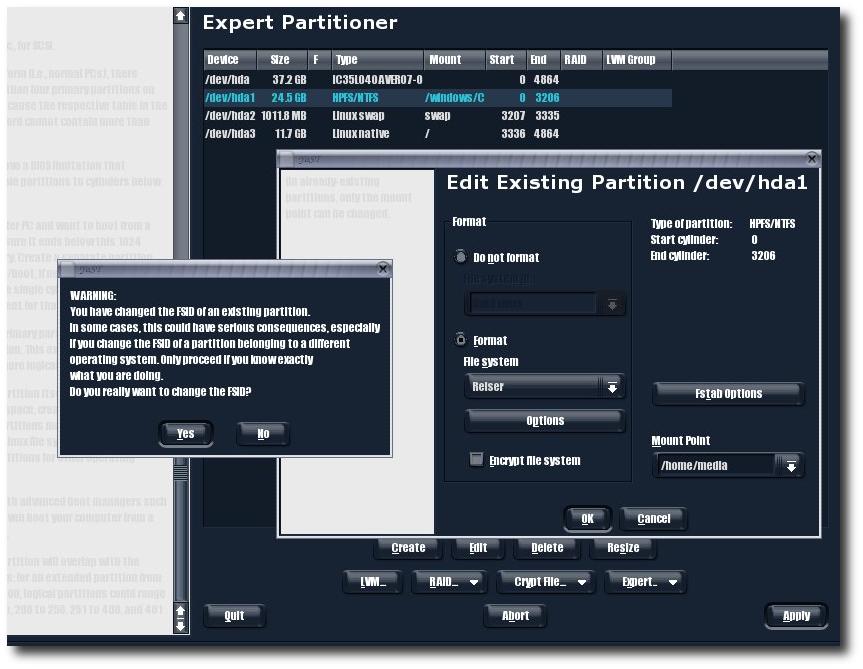

Before formatting the NTFS partition, I was able to transfer data to the Windows partition using special tools. Linux can read NTFS, but not write to it, whereas Windows only understands its own filesystems (FAT, FAT32 and so forth) so there is no reciprocity. Nevertheless, there are tools which enable Windows users to read a Reiser filesystem, which is a common Linux filesystem.

  • rfstool – read ReiserFS under Windows
  • YAReG – a .NET GUI for the above tool

They both require the user to boot into Windows, which is why I gave up on them and decided to stick to Linux partitions instead.

Format menu

The moment of truth: so long Windows partition (click to enlarge)

To cut a long story short, I now have two Linux partitions, which I am extremely happy with. This move would not have been simple if it weren’t for the kind help from Houghi.

At an earlier stage I thought about installing Mac OS X on the new partition. Unfortunately, the process seems time-consuming, complicated and unreliable at its end. Moreover, it turned out that this had never been possible as Mac OS X (specifically the hacked version which runs on any machine) will not function under a partition, i.e. it requires a separate physical drive. To the curious, there are full instructions on how to installed Mac OS X on any standard PC. Many pictures and screenshots are included.

Saturday, August 13th, 2005, 5:36 am

Program Invocation Methods

There are at least 5 paradigms for opening applications in your operating system. These differ in terms of efficiency, versatility the the learning curve (experience) that is initially involved. If the average user invokes programs dozens of times a day, choosing the right invocation method is worthwhile.

KDE launcherMethod #1 – Application Menus (Launcher) – familiar to most under the heading “Start Menu”, which of course corresponds to Windows users. Therein lie all the applications, well-filed and catalogued depending on their nature. Many users retain everything directly under “Programs” (no extra level of hierarchy), but installations of Linux often subcategorise programs by type, e.g. “Internet”, “System”, “Graphics” etc. (see image on the left, click to enlarge). Large Windows installations, which have hundreds of programs incorporated, often do likewise.

Method #2 – Command-Line Interface (CLI) – simply put, it is the case of invocation using text — textual commands and a trigger (e.g. ENTER). Windows will soon have Monad, which is a command-line tool that addresses a serious deficiency. Linux and Mac OS X (UNIX-based) already contain advanced command-line facilities, which are well ahead of the long-forgotten MS-DOS in terms of power and expressiveness. Monad will not be included in Windows Vista due to security holes that have recently been unveiled.

Method #3 – Dock/(child-)Panel/Launch Bar – the assemblage of many application icons in a small space. That space is usually visible at all time, even when windows are maximised (see example below).

Child panels

Method #4 – The ‘Busy’ Desktop – a few people prefer to keep all their favourite programs in their desktop space. This can result in clutter and the major disadvantage is that icons are not always visible. Hence, icons (applications) are not accessible at ease. The notion of “Show Desktop” (START+"D" in Windows, CTRL+ALT+"D" by default in KDE) mitigates this inconvenience as one can minimise and then maximise all windows simultaneously.

Desktop with previews

PDF‘s, text files, HTML‘s and
directories in the KDE Desktop with previews
(click to enlarge)

Windows 98

My Windows 98 laptop (click to enlarge)

Method #5 – Keyboard Accelerators – there is support in most (if not all) operating systems for assignment (AKA binding) of keys to certain operations or invocation of programs. A previous item in this site explains how this can be achieved in Windows and Linux.

Method #6 – Mouse Gestures – interpretation of mouse movement as to understand the user’s desire. I have not come across mouse gestures in a typical desktop environment. However, Opera and Firefox (some details here) already support it very effectively.You can navigate by moving your hands in special, distinguishable ways. The idea is reminiscent of voice commands.

Real-time Posts

Posts by @schestowitz

Retrieval statistics: 23 queries taking a total of 0.090 seconds • Please report low bandwidth using the feedback form
Original styles created by Ian Main (all acknowledgements) • PHP scripts and styles later modified by Roy Schestowitz • Help yourself to a GPL'd copy
|— Proudly powered by W o r d P r e s s — based on a heavily-hacked version 1.2.1 (Mingus) installation —|