Wednesday, July 27th, 2005, 4:18 pm
According to Bloomberg, innovation definitely required motivation:
Microsoft has had the ability to develop a satellite map service for MSN since 1998. Chairman Bill Gates decided in April, the same month Google released its version, to rush the project. He gave his engineers a deadline of 100 days. Stephen Lawler, who runs the Virtual Earth group, and his team figured they would need about a year to get the satellite mapping technology ready.
 Also on the same topic, it is rather frustrating that it took several years until Microsoft decided to fix the bugs inherent in Internet Explorer 6 and add valuable yet fundamental features like support for feeds. This move was a result of Firefox, of course, but more sadly, Internet Explorer 7 imitates Firefox, much like Virtual Earth intends to match Google Maps and show that development in the Microsoft compus is not dead, yet. Note the subtle use of the word development, not innovation.
Wednesday, July 27th, 2005, 6:15 am

Inkscape is yet another Open Source image manipulation program (admire the screenshot gallery). Its GUI resembles that of GIMPShop (a popular branch of the GIMP) or the commercial leader, Adobe Photoshop. It has the words “Photoshop killer” written all over it, as unlike the GIMP, it greatly assimilates to Photoshop, which makes a migration easier. It should also run neatly under Linux, Mac OS and Windows.
Some months ago I heard rumours that Microsoft intend to provide an image manipulation add-on (in the form of a download) for Windows, thereby addressing one of its deficiencies. Too often do I see people use paint.exe for image editing. This requires much more time than necessary and usually achieves appalling results. While on the issue, how about Windows’ urgent need for a decent text editor?
Wednesday, July 27th, 2005, 2:34 am

Getting data more quickly using a CLI
 ome time ago I came across YubNub – YubNub.org which is a command-line interface for the Web. It allows you to operate in and on the Web much more efficiently than by using the traditional GUI‘s. You can, for example, query Google for ‘saturn’ by typing in
g saturn
YubNub provides a very quick way of navigation the Web as chaining of commands is possible too and nearly 100 commands exist. The site was a great find, but I do not believe it can replace a keyboard-navigable portal (see example). Maybe I can embed the YubNub command-line in portals at some stage, which would make it ever more flexible. While on the issue of portals, Google have extended features offered by their Portal (personalised homepage) service. Among the new features:
- Adding your own bookmarks
- Selecting from more news feeds
- Adding your own RSS news feeds
Tuesday, July 26th, 2005, 2:41 pm
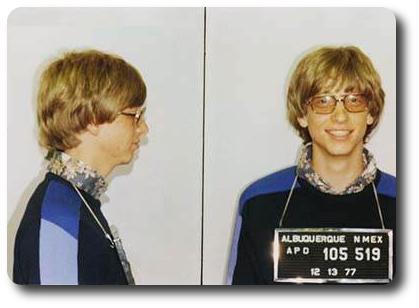
Bill Gates arrested in his younger days (photo in public domain)
From a thought-provoking article in USA TODAY:
Speaking to hundreds of university professors, Microsoft Chairman Bill Gates says he’s baffled more students don’t go into computer science.
Also see:
Tuesday, July 26th, 2005, 7:08 am
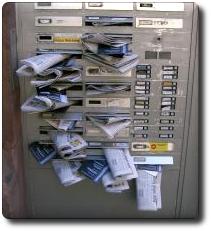
This news item comes from MOSNEWS.COM:
Kushnir, 35, headed the English learning centers the Center for American English, the New York English Centre and the Centre for Spoken English, all known to have aggressive Internet advertising policies in which millions of e-mails were sent every day.
For harassment purposes, their telephone numbers were disclosed in Wikipedia.
Tuesday, July 26th, 2005, 2:45 am

30 frames, 63 colours, 200 KB in total
The GIMP is an excellent Open Source program, which among its many functionalities, caters for composition of animations. To demonstrate this powerful feature in action, I generated a spinning globe of the site’s visual identity.
Generation of video sequence is not trivial in the GIMP, so below is a ‘recipe’ which corresponds to menu layouts in GIMP 1.2.3.
- Open the image of choice
- Hold down the right-hand mouse button (right-handed mouse) over the image to open the image menu
- Follow through to
Script-Fu » Animators » Spinning globe...
- Select the number of frames to generate as well as the number of colours for an indexed palette if the default values do not suit you.
- Once generated (a potentially time-consuming process), Save the image as GIF. Ensure you make it a video output (“
Save as Animation“), which is not the default choice.
Manipulation and navigation between frames (actually image layers) is non-trivial in the version that I currently use (I use versions 2.x as well, though not sufficiently often to comment about it). Nonetheless, the outputs can be impressive. As another set of examples, my photo gets subjected to ripples, then waves.
Monday, July 25th, 2005, 1:20 pm
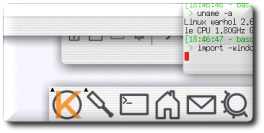

The bits shown above come from an excellent Linux screenshots gallery which bound the following caption to the original image.
Gentoo GNU/Linux, KDE 3.3, xorg 6.8. Demonstrating the new shadow and translucently window features. Consider the new stuff a proof of concept, it’s far from usable, but it works.
Months ago I discovered several Mac OSX lookalikes in KDE-Look, for example White Acqua, which is a nice (yet fragile) window decoration.
Related pages: local gallery of KDE screenshots.


 Filed under:
