


Running Experiments Over SSH
 Filed under:
  AD habits die hard. Good habits stay, so over time we do things more effectively. Today’s post may be relevant to post-doctoral folks whose work involves a lot of computation, including over-night or multi-day experiments.
6 or 7 years ago I wrote detailed posts about how I was using KDE to run experiments on entire clusters of Fedora boxes, over SSH. It has been a long time since then and nowadays, rather than use many dual-core boxes I just mostly use a pair of 8-core computational servers. The tricks are mostly the same and the scripts are largely reused from those that I wrote around 2004 (they are publicly available in this Web site). The procedures are mostly the same, but technically, a few things have changed and this post will detail them (aside from that, back then I did my Ph.D. and now I get paid to run these experiments).
In case of network issues, it is important to run everything but the computation locally. This means that code editing, for example, should be done locally. This reduces cursor/menu lag and prevents loss of work in case of loss of connection. It also assures that files get written to more than one place (local plus remote). Kate with KIO (in Kate) use slaves to enable editing of files over SFTP or SCP/SSH, so this functionality ought to be exploited for controlling experiments remotely. For other tasks, separate terminal windows (e.g. Konsole) should be opened, preferably with endless scrolling buffer, for each remote machine. GUIs can be created to enable quick adjustment and running of experiments. A good terminal will stay active and visible even when a remote connection gets closed, in which case, results can still be observed. In addition, it may help to have another terminal window connected to each remote machine in order to track load throughout runtime, as well as other things (one busy session may permit nothing else to be done on the same terminal). Here it is illustrated graphically, based on screenshots just taken.
Full screen view on workspace 8 (research):

Let’s break it down into the left and right monitors:
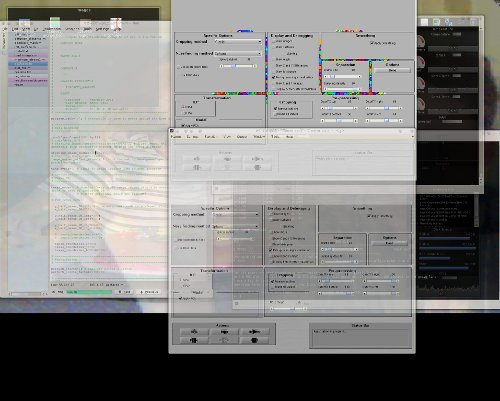
This left side of the dual-head display contains the tabbed-style view of program files that need editing. All those files are using KIO to essentially be seen as local even though editing them modifies them on the remote servers that I connect to (see terminals on the right). In addition, I used Java framework to create a GUI front end for the experiments. It is singleton for each server.
On the other screen I have this:

Shown at the top left is a window that’s invoked by the program when results are ready. By using KDE’s window-specific settings I can force all such windows to always open in workspace 8 (research), so even if I am busy with other tasks the windows will quietly show up where it belongs, sometimes along with dozen other windows that need attention later. On the right side there are terminals connected to the computational servers. One currently gets used to rsync the code across across servers and the other is tracking server loads.
So, this is pretty much how I use workspace 8. I previously explained how I use workspace 2 (there are 12 in total). KDE makes it easy to multi-task without getting distracted.



 N my most powerful desktop I only have 2 gigabytes of RAM. Usually it’s fine for everything to be run simultaneously, but under certain circumstances it’s possible for the swap file to kick in and typically start to be accommodated with active processes, notably KDE applications that exist in view all the time. So I got some scripts together to clean up the swap file and move those processes back to RAM, which makes them quicker (no need for disk I/O).
 N the middle of last year I found myself with an extra new widescreen monitor that could not be used because my graphics card only supports up to two monitors. I pondered buying a new graphics card to add a third or fourth monitor to the same box, but this turned out to be uneconomic. So instead I bought an extra box and installed Debian Squeeze on it. It would add a processor to my setup and also help stay connected when either of the machine requires downtime. Over time I learned how to properly use this “helper box”, which is connected to a separate mouse and keyboard. It is mostly used for monitoring of information that changes over time.
 OZILLA is arguably responsible for restoring competition on the Web browsers front and also for ensuring that Web designers target more than just one browser. For that, companies like Apple and Google have a sort of ‘debt’ to Mozilla and it’s reassuring to hear that Google funds Mozilla to a great degree, still. But Mozilla has been having issues with its browser — issues that are perhaps more perceptual than real (technical). But moreover, the peril that Mozilla is having would have to be new competitors, some of whom rely on the KHTML engine (which sort of became WebKit). KHTML and WebKit also make their way into KDE in the form of new browsers like Rekonq, which are excellent (better than Konqueror for some tasks). These integrate well with a Qt-based environment, they are lightweight, and they interact better with the K Desktop Environment (or KDE SC). For KDE users who look for a Firefox alternative,
  VERY once in a while we hear someone tell the public that, based on anecdotal evidence alone, people leave GNU/Linux for Apple. Well, on the phone front, if not on all fronts, Linux is actually beating Apple, which is why Apple is suing like mad.
 oday I received an early Christmas gift of sorts — a package from a fellow advocate of GNU/Linux called Kari Laine. It will provide a lot of geeky-type fun for a home project I Intend to write a review about at a later date.