Introduction About Site Map

XML
RSS 2 Feed RSS 2 Feed
Navigation

Main Page | Blog Index

Sunday, June 5th, 2011, 7:23 am

TechBytes Episode 50: ASUS Back With GNU/Linux, YouTube Likes Creative Commons

TechBytes

Direct download as Ogg (1:26:51, 19.0 MB) | High-quality MP3 (29.7 MB) | Low-quality MP3 (8.6 MB)

Summary: Rusty, Tim, and Roy return to a wide-ranging discussion

TODAY’S show covers YouTube’s embrace of Creative Commons, ASUS hardware’ embrace of Ubuntu, scepticism of Web statistics, and a lot more.

Today’s closing tracks are “invisible Boy” by John Smith and “Bell Tower Bass” by Eli Smith (same surname, very different styles). Both are taken from SXSW 2010 (get the torrents legally here). We have many more in the pipeline for future shows.

We hope you will join us for future shows and consider subscribing to the show via the RSS feed. You can also visit our archives for past shows. If you have an Identi.ca account, consider subscribing to TechBytes in order to keep up to date.

As embedded (HTML5):

Download:

Ogg Theora
(There is also an MP3 version)

Friday, June 3rd, 2011, 11:24 pm

TechBytes Episode 49: Linux Distributions in Middle of 2011

TechBytes

Direct download as Ogg (1:14:46, 15.9 MB) | High-quality MP3 (27.4 MB) | Low-quality MP3 (8.6 MB)

Summary: Tim and Roy talk about FOSS VOIP, several new GNU/Linux distributions, Nokia, and more

TODAY’S show starts by talking about news from Google and ends with some reviews of recently-released operating systems. Tim has the show notes in his site.

Today’s closing track is “Somebody Like Me” by Erica Nicole, taken from SXSW 2010 (get the torrents legally here). We have many more in the pipeline for future shows.

We hope you will join us for future shows and consider subscribing to the show via the RSS feed. You can also visit our archives for past shows. If you have an Identi.ca account, consider subscribing to TechBytes in order to keep up to date.

As embedded (HTML5):

Thursday, June 2nd, 2011, 11:15 pm

Efficiently Working With Text Files in KDE (or GNU/Linux in General)

Working with text

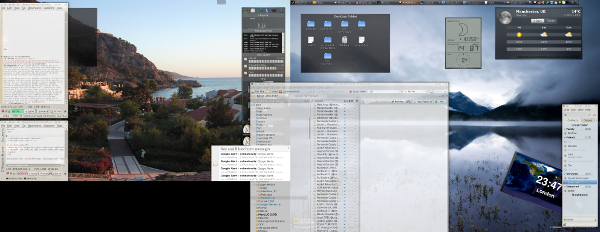
Several years ago in this Web site I explained how I work with KDE. It was so long ago that it was KDE 3.1 and I also worked with 4 or 8 dual-head workspaces (now I have 10 that are actively used). But today I would like to share some working tips that are based on adaptations I made over the years in order to increase efficiency in workflow. The short story is, just as activities should be divided conceptually based on some criteria of commonality (e.g. which window needs to be near which other windows), so should text files. It sounds very obvious, but let’s have a better, more detailed explanation.

My favourite text editor is Kate (I use xbindkeys to launch a new instance of it with CTRL+ALT+W). It is very powerful for both development and for writing. It has syntax highlighting for loads of languages/markup, on-the-fly spellchecker, indentation, etc. It also can manage sessions, where basically one can save program state with settings and then load everything from a profile. This includes plugin settings, e.g. tabbed interface for text files. I started using this feature extensively years ago, especially with tabs. Some months ago, however, I found that sometimes I needed text to be in other desktops where it can be adjacent to the windows that correspond to it. For example, development I do in workspace 8, monitoring work in desktops 5 and 6, and news/research mostly in desktops 1 and 2. So I basically broke down my editor into 4 separate sessions, each of which containing particular text files of relevance. In the picture above, shown are two text editors in tandem. One has an archive of my past posts for quick lookup that requires little browsing/navigation, just text search in an enormous text file (tens of megabytes). The top part has about 4 files open, ranging from posts in progress, links that are accumulated, quotes I commonly use, and also some templates of value. There tends to be more in there.

The bottom line is, if you work a lot with text, consider working with raw text and a powerful editor. Putting the whole thing through an HTML-based piece of software like WordPress or even LaTeX-powered software/front ends like LyX is always possible to do at the end. But the real power is in words; the lighter and faster, the better. To improve access to files and information of interest, divide the text editors/sessions into separate desktops. This reduces movement between desktops and enables focus on particular activities, leaving distractions aside. If you have to open the file manager a lot, then perhaps a better workflow is being missed. Shortcuts too can help.

By the way, my KDE session as shown above has run for over two months without even a second login. The desktop’s robustness sure is impressive! The tips above apply not only to KDE. Other editors can achieve something similar.

Tuesday, May 31st, 2011, 8:50 pm

YouTube Versus Television

TECHNOLOGY moves on and one must adapt to it. “Luddite” a word that is often used to discourage those who deviate from the norm, such as those who refuse to carry a mobile phone everywhere they go.The term Luddite in this case refers not necessarily to rejection of progress but to conformity of lack thereof.

Television is a generic term which refers to a device for remote viewing of something. Conventionally, however, we think of television as a set although some large bits of furniture or even projectors might nowadays qualify as televisions. What is common in almost all of them is that, with the exception of streaming or on-demand viewing, television is controlled by broadcasters, who have a lot of control over the viewer’s mind many hours of each day. The viewer can typically select the least undesirable channel among a finite number. Just because there are many channels these days does not mean one can watch a lot of them at once (simultaneously), so this limitation remains. The choice is elusive.

YouTube is different for several reasons as by its nature it allows anyone to broadcast and it also gives the viewer a lot more control over what is being watched. This is why I stopped watching television and eventually gave my set to a friend. The set was of no use anymore. It felt more like a device for passing commercials and clips that I did not wish to see. Sure, there were exceptions, but those were very rare. To choose a channel is still an illusion of choice as that hardly leaves much selection in the hands of the viewer. The choices are preselected by other people.

Recently I started to get more actively involved in YouTube not as a mere viewer. Back when YouTube presented statistics on how many videos a given account has watched the number 22,000 came up and since then I have watched probably about 50,000 videos on YouTube. So I pine to become part of those who contribute. In the coming weeks I will convert some older material and upload it to YouTube. It may be an interesting experience. Can a viewer engage in a two-way exchange of information? That certainly would be beneficial to society as it can weaken the power of media empires over people’s minds. It can also help promote the TechBytes show to people who never heard about it. At the very least as an experiment I shall see how it goes. This might be rethought.

Sunday, May 29th, 2011, 2:58 pm

Reflections on Permanently Moving From KDE3 to KDE4: 2 Years Later

KDE3 and KDE4

My last KDE3 desktop on the left and the current KDE4 desktop on the right

MY FIRST experience with KDE4 was KDE 4.1. I had not had a reason to abandon what I was using back then (no upgrade treadmill). I finally started using KDE4 (full time) when 4.3 came out. From that point onwards I could not really go back to KDE3 and be happy. There was nothing in KDE3 that I really did not have in KDE4.

GNOME seems to be going through a similar phase of transition right now. Linux Mint is clinging onto GNOME2 and some users abandon GNOME altogether because of Unity or Shell. Eventually, however, it will probably stablise and users will come to accept change. It can take time (maybe years) and despite minor changes that take some time getting used to, KDE3 does everything substantial that KDE3 could do and it actually does a lot more with decent performance (comparable or better than) w.r.t. to KDE3 on the very same hardware.

All improvements come with a learning curve.

Saturday, May 28th, 2011, 1:50 am

TechBytes Episode 48: First Time With Flash Option

TechBytes

Direct download as Ogg (1:04:41, 13.8 MB) | High-quality MP3 (24.4 MB) | Low-quality MP3 (7.4 MB)

Summary: Tim and Roy speak about some of the latest news items which pose danger to software freedom

TODAY’S show is unique as it is the first time we produce a Flash option for listening to the show. We talk about GNU/Linux in North Korea, HTC’s Microsoft tax on Linux, and the pressure for Steve Ballmer to step down (among many other topics).

Today’s closing track is “1977″ by Anita Tijoux. The track comes from the usual source. All tracks are from SXSW 2010 (get the torrents legally here). In previous shows we played many good tracks such as April Smith’s “Colors”. There was also “Edge of My Seat” by Amber Rubarth, “Have This Drink” by Black Mike and Kemistry, “Joyful Noise” by Breakestra, “Sei La” by Erika Machado, “El Camino” by No te va gustar, “Future Eyes” by Ear Pwr, “Tokki no Rassha ” by Dolly, “Quanto Tempo” by Doces Cariocas, “Cos I said so” by Fangs, “Iguana” by SambaDa, “We Should Give” by Amity, “Blackout City” by Anamanaguchi, and “She’s Got You” by Cosmo Jarvis. We thank those artists for choosing to spread their good work. We have many more in the pipeline for future shows. We hope you will join us for future shows and consider subscribing to the show via the RSS feed. You can also visit our archives for past shows. If you have an Identi.ca account, consider subscribing to TechBytes in order to keep up to date.

As embedded (HTML5):

Download:

Ogg Theora
(There is also an MP3 version)

Tuesday, May 24th, 2011, 3:00 am

Virgin Trains’ Customer ‘Support’ a Waste of Time

Speeding train

A couple of months ago Virgin Trains made an error which left me with an invalid couple of tickets. I had to purchase 2 new tickets in London and be late as a result, too. At the end of the day I approached Virgin, attempting of course to resolve this over the counter, instead being referred to customer support (by snail mail to Birmingham). After carefully writing an explanation and enclosing the unusable tickets I have been writing a couple of letters to them, passing them by post at the expense of my time and patience. They later ended up sending me a survey to provide feedback on customer support (which I did send them) rather than actually write back about the case of their mishandling. The post never came from them.

To cut this long story short, this whole experience was money down the drain and then a lot of time down the drain. I probably won’t buy tickets from Virgin Trains again. It’s not even worth losing hours like this, either in vain (like in my case) or where the outcome might be rightful compensation. I can only advise others to avoid Virgin Trains as well. After they mess up, their Customer ‘Support’ team failed to pick up the pieces. It’s a recipe for unhappy clients.

Real-time Posts

Posts by @schestowitz

Retrieval statistics: 23 queries taking a total of 0.098 seconds • Please report low bandwidth using the feedback form
Original styles created by Ian Main (all acknowledgements) • PHP scripts and styles later modified by Roy Schestowitz • Help yourself to a GPL'd copy
|— Proudly powered by W o r d P r e s s — based on a heavily-hacked version 1.2.1 (Mingus) installation —|