Thursday, January 12th, 2012, 1:48 am
Geometry Gurus Needed (First Order Geodesics on Surface Pairs)
 Filed under:
  COULD really use the advice of some people who are interested in computer graphics and vision — inverse but complementary fields, which are largely related to geometry and mathematics at large. The challenge is to compare surfaces based on their 3-D characteristics, using Euclidean, geodesic or another non-Euclidean metrics.
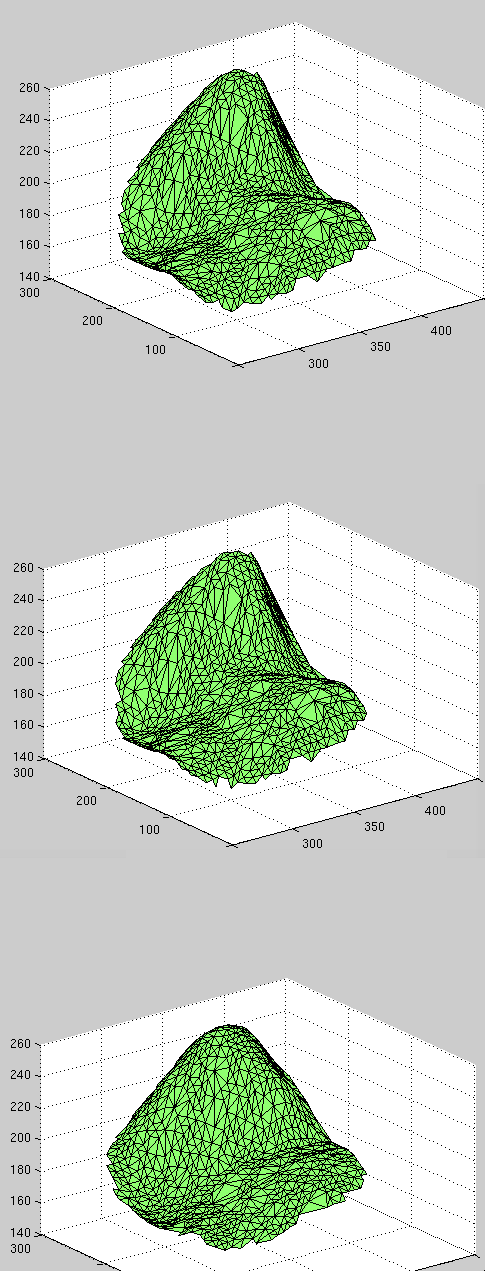
Here is what the surfaces look like.
The following image represents a performance ROC curve we have.
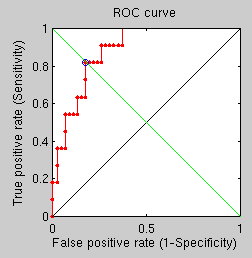
In simple terms, this means that we’re able to classify correctly about 70% of the time. Having summarised a year’s work, culminating in mostly unsuccessful experiments around diffusion (around 97^ recognition rate, the above is poor, So I return to working with geodesic distances as the Swiss army knife for measurement of distances. But the approach being explored at the moment is different and with further enhancement it can hopefully yield performance higher than 97% (matching rate). The sources of limitation are generally well understood in the sense that they can be visualised and overlaid on top of the image pairs. There is no trivial and reliable way to establish multiple landmark points around which to measure distances consistently, so I am trying another way, which at a very coarse level has a matching rate of about 80% (can be significantly improved soon).
The approach attempted at this stage involves triangle comparison post- and pre-marking, but the performance attained so far is not satisfactory.
The limitation is likely inherent in the measuring of distances in FMM and the sub-sampling that results from triangulation (see image for the size of triangles to be fully appreciated).
One particular weakness of the diffusion approach to masking is that it leads to holes in the data, which invalidates some of the measures that were used routinely beforehand. In order to fuse together both geodesic and spectral measures, we now attempt to get a more symbiotic approach that carves out surfaces based on geodesic properties and then uses spectral features on these surfaces. Since ordering does not exist (e.g. point-to-point correspondences), the histogram of images is used to describe the sub-surfaces (carved out around a known correspondence). By increasing the number of rings and bins in the histogram, the performance can be varied somewhat. I was running overnight experiment to test this and got some other appalling ROC curves, such as this:
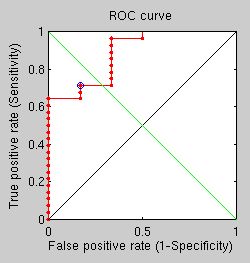
The results from the last experiment were disappointing because they did not provide good separability. So the following morning I designed and started running an experiment that explores the potential of measuring diffusion distance between furthest points in the surface carved in accordance with geodesic boundaries (several rings). This too did not give good results. Generally speaking, diffusion distance as a measurement has not proven to be anywhere as useful as FMM so far (since December). It seems to be insensitive to small differences and it does not seem to degrade linearly, either. The next experimental design will explore another new approach, perhaps conceding the potential of diffusion being integrated into the framework’s pipeline.
So the question is this: given two surfaces that are geodetically craves around the surface, what approach would you use to compare them for similarity? We’ve tried a variety of known methods, but none seems to yield very encouraging results thus far. Thanks for any advice or pointers you may have.


 OZILLA is arguably responsible for restoring competition on the Web browsers front and also for ensuring that Web designers target more than just one browser. For that, companies like Apple and Google have a sort of ‘debt’ to Mozilla and it’s reassuring to hear that Google funds Mozilla to a great degree, still. But Mozilla has been having issues with its browser — issues that are perhaps more perceptual than real (technical). But moreover, the peril that Mozilla is having would have to be new competitors, some of whom rely on the KHTML engine (which sort of became WebKit). KHTML and WebKit also make their way into KDE in the form of new browsers like Rekonq, which are excellent (better than Konqueror for some tasks). These integrate well with a Qt-based environment, they are lightweight, and they interact better with the K Desktop Environment (or KDE SC). For KDE users who look for a Firefox alternative,
  NE common complaint about WordPress is that it requires frequent updates. But the matter of fact is, very few of these updates nowadays are security-related, so provided one does not ride along with the treadmill, it should be possible to check the release details and see if an update is crucial for security. For over half a year (until recently) WordPress had no security updates. There were not known flaws. So for those who maintain many WordPress blogs (I run about 10) or have to manually upgrade some of them due to hosting setup, an update to WordPress should only be required once in a very long time. Nobody forces an update and provided one is comfortable lagging behind on the features, WordPress should not be marked down on the basis of release pace.
 HE BUSINESS model of Facebook is truly poison on the World Wide Web and the Internet at large. It is the very opposite of what the Web was intended to achieve. At risk of stating the obvious, Facebook is a multi-player popularity game where information about one’s real friends is hidden behind walled gardens. The access to such information is conditioned upon a sort of blackmail which is giving one’s personal details away, for advertisers to spy on individual people and in turn impose on them all sorts of proprietary lock-ins and barriers, at the behest of affiliates. Rather than a society that openly shares we become a society of cliques and stalkers — people to whom the rules of society are determined by sociopaths like Mark Zuckerberg, who calls Facebook users “dumb fucks” (real quote) for trusting him.
 VERY once in a while we hear someone tell the public that, based on anecdotal evidence alone, people leave GNU/Linux for Apple. Well, on the phone front, if not on all fronts, Linux is actually beating Apple, which is why Apple is suing like mad.
 ith recent milestones reached and a change in publication strategy, I decided to unleash some easy-to-run code along with the 535 pages which document the code as well as experiments that have been run using this code over the past year or so. The document is not as organised as it ought to be, but I hereby make a lot of stuff available in fairly raw form. I made an HTML version to overcome file size issues that are associated with PDF, not to mention accessibility issues.