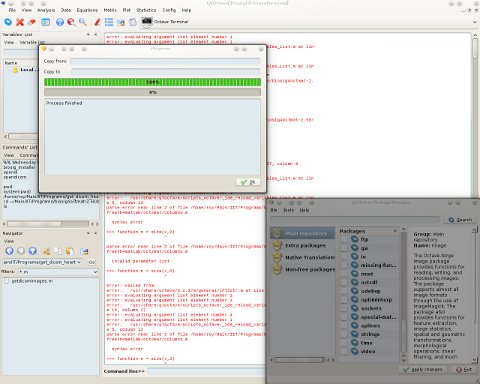
 HIS MORNING I spent some time helping others make the same migration which happily enough I made over a month ago (so far, so good!). It’s a migration from proprietary software (and BSA backer) to free-as-in-freedom software, which also happens to be a GNU project. It helps that the project is cross-platform because unlike myself and many others, there are still a lot more Windows users out there. Moving them to Free software on Windows is an essential step which removes barriers when they swap the whole platform. GNU works better on GNU/Linux than on Windows, for obvious reasons. Although it’s a matter of opinion, under KDE QtOctave looks better than MATLAB, as well.
Installing GNU Octave in GNU/Linux is very simple because it is packaged in the repositories of *buntu and Fedora. These are the two distributions where I have checked to verify this although I encountered bumps along the way in Fedora [1, 2, 3]. It is not entirely Fedora’s fault and it’s a known issue that affects many people who are Octave users.
The packages one need to fetch via yum/apt-get (or graphical front ends like Synaptic and KPackageKit) are “Octave” and “QtOctave”. They are not large packages and they should be able to fetch dependencies that are being determined and resolved by the packager/packaging process. Once these are installed, an icon will typically show up somewhere along/inside the menus. If not, run qtoctave from the command line and ensure it gets access to the octave executable (it usually works perfectly ‘out of the box’ based on my experience on multiple boxes). Yes, this should work by default without user intervention, but in case it does not, ensure octave is properly installed and put in the path.
I am unfortunate enough to have faced Windows for about half an hour just now (not my computer) because in some cases, for collaboration purposes, computers that run Windows also need to have Octave installed on them, along with QtOctave for improved ease of use. The way to get that installed is a lot more complex and time consuming because Windows does not have packages managers (this is one of the areas where GNU/Linux is ahead of its competition). In any case, here is how one should install everything and get it set up
Navigate to the downloads page of Octave. At the time of writing (and this may change in the future) there is a native build for Windows, which seems to work without any issues in Windows XP and probably predecessors too. Scroll down to part which says: “The Octave Forge project hosts a native Windows binary distribution of Octave built with the MinGW compiler.”
This leads to Octave-Forge. Near the top of the page there is a “Windows installer (Octave and Octave-Forge)” listed. Now, download the file which is an executable (.exe) and run that. Follow the simple process of installation until completion and at the end ensure that Octave is installed and then listed among the programs in the Windows “Start” (now just Windows logo) menu. The main program is just called “Octave”. When it’s executed it offers a command line prompt which is the Octave interpreter. If everything works fine at this stage, then Octave runs properly and it is time to install the graphical wrapper, QtOctave.
Qt is a cross-platform graphical toolkit and a front end for Octave was written with it not so long ago. The main build is for GNU/Linux with tendency towards KDE, but there is also a Windows port and the one which works best can currently be found in outsch.org. There is a ZIP archive in there, so download it with caution (it is not an official source). Finally, uncompress the file and install it in a suitable location of choice on your hard-drive partition (e.g. C:). When all the files are extracted from the ZIP archive find the qtoctave executable (qtoctave.exe) under the directory containing the DLL files and the other binaries. If necessary, create a convenient shortcut to this file. Unlike UNIX-type environments, paths in Windows are not quite as universal, so QtOctave may not have anything defined regarding the location of the octave executable. Depending on where it’s installed, it may need to be entered manually, otherwise QtOctave will not be able to access the very core and engine of Octave. If that’s the case, go to the “Config” menu (top menu), then “general configuration” (menu item), then “Octave”, “Octave path”. Put in the text field the full path to the Octave executable where you had it installed earlier. This ensures QtOctave knows where to find it. Restart QtOctave (for settings changes to take effect) and once the program can detect the executable ensure it can provide a command prompt for .m files to be run or for commands to be entered manually. If needed, run a basic function like plot just to ensure that graphical units of Octave are also fully supported and installed without any conflicts. QtOctave comes with several units including an editor and it integrates quite well, including drag-and-drop support.
The point of this whole exercise is to liberate users whose personal programs that they write are stuck in the “MATLAB trap”, so to speak (like the old “Java trap”).
If you are interested in converting fellow staff and their students to Octave, remember that it suits an educational environment much better as it encourages sharing and collaborating, not asking for permissions, paying heavy fees/fines, and begging developers to fix bugs rather than have access to the source code, which in turn enables participation. Additionally, most of the basic functions are truly compatible with MATLAB’s and the lack of JIT optimisation, for example, should not matter much in an educational setting. Not many people create MATLAB GUIs either, so there is hardly a need for such advanced functionality. At a later date I hope to make some screencasts about Octave.


 Filed under:
  HAD worries that GNU Octave would not support some of the advanced graphing functionality of MATLAB, but with the help of tools like gnuplot, Octave stays on par in this game (bar some OpenGL enhancements). Much to my surprise, the 3-D charting and graphing software in GNU Octave. Here are some visualisations of cardiac images I work with.


 Today’s show ends with “Rock n’ Roll Hall of Fame”. We hope you will join us for future shows and


 VERY program has areas worth improving. GNU Octave is no exception and I’ve been trying to submit bug reports (via Savannah) only to find that it has just been compromised (therefore temporarily down), so in the mean time, here is the gist of issues that I found so far.