Wednesday, July 27th, 2005, 2:34 am

Getting data more quickly using a CLI
 ome time ago I came across YubNub – YubNub.org which is a command-line interface for the Web. It allows you to operate in and on the Web much more efficiently than by using the traditional GUI‘s. You can, for example, query Google for ‘saturn’ by typing in
g saturn
YubNub provides a very quick way of navigation the Web as chaining of commands is possible too and nearly 100 commands exist. The site was a great find, but I do not believe it can replace a keyboard-navigable portal (see example). Maybe I can embed the YubNub command-line in portals at some stage, which would make it ever more flexible. While on the issue of portals, Google have extended features offered by their Portal (personalised homepage) service. Among the new features:
- Adding your own bookmarks
- Selecting from more news feeds
- Adding your own RSS news feeds
Tuesday, July 26th, 2005, 2:41 pm
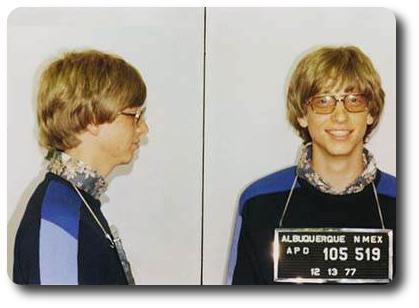
Bill Gates arrested in his younger days (photo in public domain)
From a thought-provoking article in USA TODAY:
Speaking to hundreds of university professors, Microsoft Chairman Bill Gates says he’s baffled more students don’t go into computer science.
Also see:
Tuesday, July 26th, 2005, 7:08 am
This news item comes from MOSNEWS.COM:
Kushnir, 35, headed the English learning centers the Center for American English, the New York English Centre and the Centre for Spoken English, all known to have aggressive Internet advertising policies in which millions of e-mails were sent every day.
For harassment purposes, their telephone numbers were disclosed in Wikipedia.
Tuesday, July 26th, 2005, 2:45 am

30 frames, 63 colours, 200 KB in total
The GIMP is an excellent Open Source program, which among its many functionalities, caters for composition of animations. To demonstrate this powerful feature in action, I generated a spinning globe of the site’s visual identity.
Generation of video sequence is not trivial in the GIMP, so below is a ‘recipe’ which corresponds to menu layouts in GIMP 1.2.3.
- Open the image of choice
- Hold down the right-hand mouse button (right-handed mouse) over the image to open the image menu
- Follow through to
Script-Fu » Animators » Spinning globe...
- Select the number of frames to generate as well as the number of colours for an indexed palette if the default values do not suit you.
- Once generated (a potentially time-consuming process), Save the image as GIF. Ensure you make it a video output (“
Save as Animation“), which is not the default choice.
Manipulation and navigation between frames (actually image layers) is non-trivial in the version that I currently use (I use versions 2.x as well, though not sufficiently often to comment about it). Nonetheless, the outputs can be impressive. As another set of examples, my photo gets subjected to ripples, then waves.
Monday, July 25th, 2005, 1:20 pm
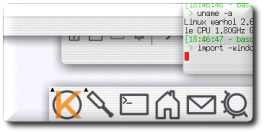

The bits shown above come from an excellent Linux screenshots gallery which bound the following caption to the original image.
Gentoo GNU/Linux, KDE 3.3, xorg 6.8. Demonstrating the new shadow and translucently window features. Consider the new stuff a proof of concept, it’s far from usable, but it works.
Months ago I discovered several Mac OSX lookalikes in KDE-Look, for example White Acqua, which is a nice (yet fragile) window decoration.
Related pages: local gallery of KDE screenshots.
Monday, July 25th, 2005, 6:52 am
 Raymond Kurzweil, the man who made fascinating predictions such as the emergence of the Web and defeat to humans against the computer in chess, foresees artificial rejuvenation of cells by 2030. This essentially talks of inner-body maintenance, leading to longevity provided you can afford it. The article also states: “Given all of Kurzweil’s successes to date, it seems unwise to dismiss his forecasts for 2030 and beyond”.
Skeptics will point out that Kurzweil is reaching the age when his ideas should be taken with a grain of salt. It seems like wishful thinking which comes from a man who will be 82 in 2030. Nonetheless, the article makes an interesting read. The predictions, as the article phrases them:
By 2030, Kurzweil believes, biomedical technology will have advanced to the point where it will be possible to halt the body’s aging process.
…
Soon after that, around 2050, we should be able to reverse-engineer a human brain and upload it into a robot.
Monday, July 25th, 2005, 1:33 am
 emonstration below is no screenshot. It is a fake composition which I pulled together under the GIMP, yet where are the spherical desktops? Where has this initiative disappeared? Microsoft are finally incorporating some transparency in Windows Vista, but why concede an attractive spherical environment? Surely in pragmatic terms, the gain from this graphical developments is nill; it is probably a loss. The heavy computational load, however, can be handled using graphical acceleration hardware.
Wallpaper from Houghi (click image above to enlarge; non-lossy PNG version)


 Filed under: