Friday, February 10th, 2006, 2:55 pm

 OOGLE have introduced and released cross-desktop search, which is an extension of their popular Google Desktop. That piece of software was recently embraced by IBM and it was included in a Windows ‘distribution’ from Google. It already raises many questions and privacy concerns. Not only your trusted colleagues will be able to gain access to your data.
Google Copies Your Hard Drive – Government Smiles in Anticipation
Consumers Should Not Use New Google Desktop
Related items:
Friday, February 10th, 2006, 7:02 am
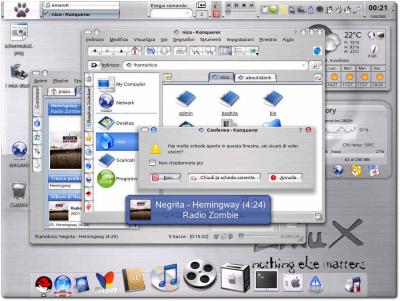
Spicing up a Linux desktop
 HIS short essay describes a variety of ways which I have found to increase ‘desktop productivity’. It identifies and covers 3 aspects of customisation, albeit without much obvious connection. Think of them as streams of consciousness.
- Workspace: first and foremost, use virtual desktops. The site introduced and described them before and also outlined a way of taking full advantage of them.
- Panels and screen edges: another significant step, which I took over a year ago in all computers, is automatic hiding of all panels as to avoid distraction and visual clutter (many panels over here, 7 of them on one screen). The exceptions to automatic hidding: new mail notification widgets and a system monitor (minimalist display of processor usage, memory and swap, refreshed several times per second), among your other must-have widgets. Even a clock should only be made available on demand (e.g. when touching screen edges) as it otherwise becomes an unnecessary eye-catcher. Screen corners have no special significance, but in newer versions of KDE, movement between virtual desktop can be controlled by ‘pushing through’ the sides of the screens, which proves somewhat useful, yet can conflict with auto-hiding of panels. Be warned.
- Theming: lastly, choose colour schemes and background pictures that suit you best. An appealing environment encourages work. I personally prefer the nocturnal, dark-coloured themes (including widgets and window decorations). Also confer: old Windows 98 example; Linux example.
Is your operating system cannot attain some of the above behaviours (or does not permit it), you may wish to consider more flexible platforms and desktop environments. My favourite is KDE on Linux. It continues to evolve very rapidly.
Thursday, February 9th, 2006, 3:33 pm

RedHat Linux
 EWLETT Packard are beginning to sell Linux laptops. An article was published today to follow a previous article from September last year, which was also mentioned in this blog.
From the article:
“HP South Africa is to release a range of Linux-based notebooks at the end of February. In an interview with Tectonic HP’s Sean Owen-Jones said the HP 6110 notebooks will sell for R5999-00 and will run the Linspire operating system.”
Ubuntu used to be the prospective choice when this was first announced:
“HP’s Sean Owen-Jones… said the company would shortly be releasing desktop and notebook PCs running Ubuntu Linux. The NX6110 notebook would be available shortly with Ubuntu and a desktop PC would also be available.”
Related item: KDE to Reach Africa
Thursday, February 9th, 2006, 6:38 am
 T can be rather amusing — if not frustrating — to see what diplomats and legislators know about technology. In an article from yesterday afternoon, Stephen Shankland describes the perils one has when it comes to educating politicians while evangelising Open Source.
Mike Evans, vice president of corporate development for top Linux seller Red Hat, traveled to California’s capitol to educate legislators in the state Senate about open-source software, but he ended up getting something of an education himself.
[...]
For example, several seemed to believe that if an administrator uses open-source software that anyone can peer into the inner workings of his or her computer system.
[...]
When Evans told the Senate’s information technology personnel he’d be brining his own Linux box to show his presentation, Evans recounted, “They said, ‘What is a Linux box?’”
[...]
And the Web site that offered streaming audio of the hearing only presents Windows Media audio files.
Wednesday, February 8th, 2006, 6:55 pm

 ICROSOFT have announced officially their intent to enter the anti-virus market a couple of months ago. They now unveil a service called OneCare (homonym of “wanker”) Live, which is paid for annually. In simple words, the customer gets protection for the operating system’s own flaws and pays $50 per year for the service from no-one but the O/S vendor. As reported by CNN:
Microsoft Corp. said on Tuesday it plans to launch a new computer security service in June, marking the world’s biggest software maker’s entry into the fast-growing consumer anti-virus market.
Microsoft’s Windows OneCare Live, a subscription-based, self-updating service, will push the software giant into competition with consumer security providers Symantec Corp. and McAfee Inc.
The article neglects to mention the controversy that is associated with this anti-competitive strategy. Microsoft exploits a monoploy in the desktop market and gives itself motives to create flaws intentionally, then offer the cure for a high cost. I believe Symantec filed an anti-trust lawsuit against Microsoft over a month ago.
Wednesday, February 8th, 2006, 5:17 pm
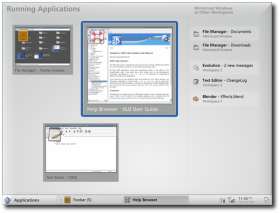
Next generation of GNOME (source)
KDE inherits Apple’s fancy dress
 N my recent vacation, I made a someone’s wish come true. I finally spent time working on a dual-boot Ubuntu setting for a friend, whom I have known since the age of 5. We both grew up on DOS, but in due time got fed up with unreliable Microsoft Windows, following its more successful days which were symbolised by Windows 3.1/3.11, 95 and maybe 98 as well (though that is where its value began to dive).
I made some gentle encouragement to make Linux the exclusive booting choice, but my friend will have to become accustomed to Linux one step at a time. This is no exception. Data migration, as well as migration of software and habit is required. Finally, he got excited about urging his parents to switch approximately 20 machines at their factory to Linux. An hour of explaining the Linux mantra and inner mechanisms was well invested. That guy is now on Mandriva 2006 as I recommended a KDE-based distribution with an AMD 64-bit processor support. Having ditched Ubuntu, he was even more satisfied, yet he kept all the installation CD’s, which he may distributed and disseminate to others.
In the process of migration, Linux (the distributions rather) received compliments on ease of installation, customisation ability, functionality and the number of available programs. We initially encountered issues due to an “expert” installlation of Ubuntu. These were attributed to privileges, which are supposed to protect the users from themselves. Ubuntu is intended for non-systems administrators, but I sometimes think that it goes too far, which can be counter-intuitive.
Wednesday, February 8th, 2006, 6:04 am
 FTER a few sleepless nights, I am finally through submitting two papers. They have put me under great pressure recently, so I even curtailed my blogging activities. I have mentioned these submissions before, but they were only impending work at the time.
 One paper has already been accepted, so the camera-ready version needed to be produced. Within a few days I will know if another paper (mentioned months ago) has been accepted and the reviewers rebuttal period will commence. All submission are to IEEE conferences or journals where I am the corresponding author. This is something that I never dreamed would be attainable. If someone predicted this out loud, I probably would have laughed. In the past year I have been fortunate enough to find myself on cloud number 9.
Another deadline approaches, namely (Medical Image Computing and Computer-Assisted Intervention (MICCAI), which gives us an opportunity to introduce and outline our entropy-based model and registration assessment, which is novel.


 Filed under:


