Sunday, March 13th, 2005, 3:31 am
The Linux enhancement under question is based on OpenGL. It revolves different virtual desktops (if you use a pager) to achieve the illusion that they hover around in space. This looks great, but it is not necessarily practical. See the 3-D Desktop project homepage.
Saturday, March 12th, 2005, 6:26 am
 Throughout the past few months, as Palm users began to migrate elsewhere, there have been talks about embracing the open-source community (i.e. Linux) and placing special emphasis on inter-operability. Many Mac users, in fact, have chosen Palm, their reasons being obvious. When one gets to think about this trend, Apple followed a similar path when Mac OS X was introduced. An alliance, in some sense, appears to be the best way to tackle giants and benefit from each other’s strengths. As an example, the wonderful design of the Macs, in particular their user interface, made Jaguar one of the most appealing and the most reliable ‘Linux distributions’. Also it made it commonplace in the market of laptops.
Let us hope that likewise, we may soon see Linux in our pockets and our schedules under Linux — something which was miserably lacked despite Linux-Palm projects like KPilot.
CNET have have just reported that Palm pursue this possibility further:
PalmSource moved a little closer to the open-source community this week.
The maker of the Palm OS has joined the Consumer Electronics Linux Forum, or CELF, pushing ahead with its plans for a version of the Palm OS that runs on top of Linux.
Cited by: PalmAddict
Saturday, March 12th, 2005, 5:13 am
Open-source advocates must have come across odd GUI‘s where formality is neglected. An example is presented below (from GIMP 1.2.3, edited using the GIMP):
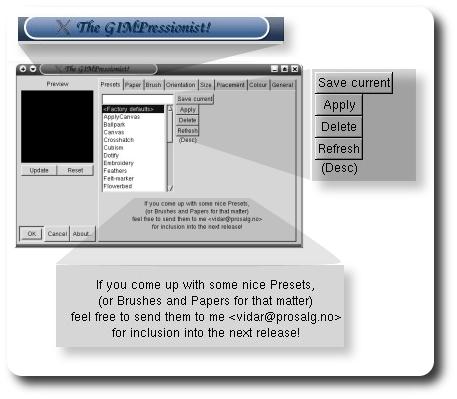
Firstly, have a look at the window title. Is the exclamation mark necessary? Secondly, look at the poor layout of the buttons. Thirdly, is the message at the bottom helpful? It does not make the application look professional. Is it inexcusable that open-source programmers cannot deploy their products in the commercial world?
Friday, March 11th, 2005, 4:17 am
Gizoogle offer 2-5 minutes of giggles. The main feature of the site is a Gangsta’ language converter.
Brought to my attention by Dr. Scott Tobkes.
Thursday, March 10th, 2005, 7:41 am
Do you happen to view your bank statements on-line? Long process, is it not? It can be automated with this huge library of Perl scripts for many different banks around the world. A click or two can reveal your balance, transactions, etc.
Wednesday, March 9th, 2005, 4:11 am
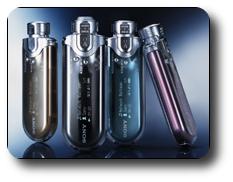
The BBC takes a glimpse at Sony’s new portable MP3 players, which somehow imitate the iPod shuffle.
Unlike hard disk-based players, (Sony’s) flash devices hold fewer songs, using solid state memory rather than a disk.
The Sony line-up includes MP3 players which hold a similar number of songs to the iPod shuffle – about 250 – but the players have much longer battery life.
The home of the Walkman finally realised the importance of this entertainment niche.
Tuesday, March 8th, 2005, 3:38 am

Regardless of your operating system, good practice is to put recently added/changed files in a container (let us call it transfer). Files should be accumulated in transfer until the next backup cycle. Once a backup of that container is obtained, files can finally be moved appropriately to their destined directory. The notes that follow deal with a method of automatically backing up transfer using a server or another hard-drive. It also places emphasis on back-up of Web sites — a task which can become closely-related.
Note: instructions are Linux/Mac-specific, but can be adapted to Windows
Until recently, I used to get gunzipped tar archives of all my sites from CPanel. I did this every morning. Some weeks ago I automated part of the process by getting more crucial (and frequently-changing) pages and storing them remotely. It all works as follows:
Set up a set of batch scripts (let us call them dummy1..2) which include the following commands:
cd /home/roy/Main/Transfer_Archives/Sites/Roy/

wget -r -l1 -t1 -N -np -erobots=off http://schestowitz.com/
If you are not sure what the latter is doing, type in man wget and read the documentation. Then, set up cron jobs which include the following tasks:
Get local copies of important Web pages (see above)

38 23 * * * /home/roy/Main/Transfer_Archives/Sites/dummy1

38 23 * * * /home/roy/Main/Transfer_Archives/Sites/dummy2

...

Compress all the pages

50 23 * * * tar czvf /home/roy/Main/Transfer_Archives/www-`date +%Y-%m-%d`.tar.gz /home/roy/Main/Transfer_Archives/Sites

Make a copy of compressed pages

58 23 * * * cp -rf  /home/roy/Main/Transfer_Archives/ /home/server2/transfer/roy
The last line puts a copy on the SAN, just to be 100% covered. Such scripts allow you to sleep while your sites/files are being backed up.


 Filed under: